Feed aggregator
Building trust through AI red teaming: Red Hat's approach to testing model safety
Accountability Without Control Is Breaking Security Leadership
Laurie Anderson Is Quoting Me
Not by name, but Laurie Anderson quotes me in one of the tracks of her new album:
My favorite quote is from a cryptologist who said “If you think technology will solve your problems, you don’t understand technology and you don’t understand your problems.”
Also in interviews:
“Of course, it’s ridiculous, outrageous, blah, blah, blah,” Anderson says about the ad. ‘But, I mean, my favorite quote on this is from a cryptologist who said, ‘If you think technology will solve your problems, you don’t understand technology  and you don’t understand your problems.’ And I think I’m completely on board with that.”...
Announcing etcd v3.7.0-beta.0
SIG-Etcd announces the availability of the first beta release of etcd v3.7.0. This new version of the popular distributed database and key Kubernetes component includes the long-requested RangeStream feature, as well as a refactoring and cleanup of multiple legacy components and interfaces. v3.7 will deliver improved security, better operational reliability, and an improved experience for working with large resultsets.
First, however, the project needs users to test the beta. You can find v3.7.0-beta.0 here:
CISA Admin Leaked AWS GovCloud Keys on Github
Until this past weekend, a contractor for the Cybersecurity & Infrastructure Security Agency (CISA) maintained a public GitHub repository that exposed credentials to several highly privileged AWS GovCloud accounts and a large number of internal CISA systems. Security experts said the public archive included files detailing how CISA builds, tests and deploys software internally, and that it represents one of the most egregious government data leaks in recent history.
On May 15, KrebsOnSecurity heard from Guillaume Valadon, a researcher with the security firm GitGuardian. Valadon’s company constantly scans public code repositories at GitHub and elsewhere for exposed secrets, automatically alerting the offending accounts of any apparent sensitive data exposures. Valadon said he reached out because the owner in this case wasn’t responding and the information exposed was highly sensitive.
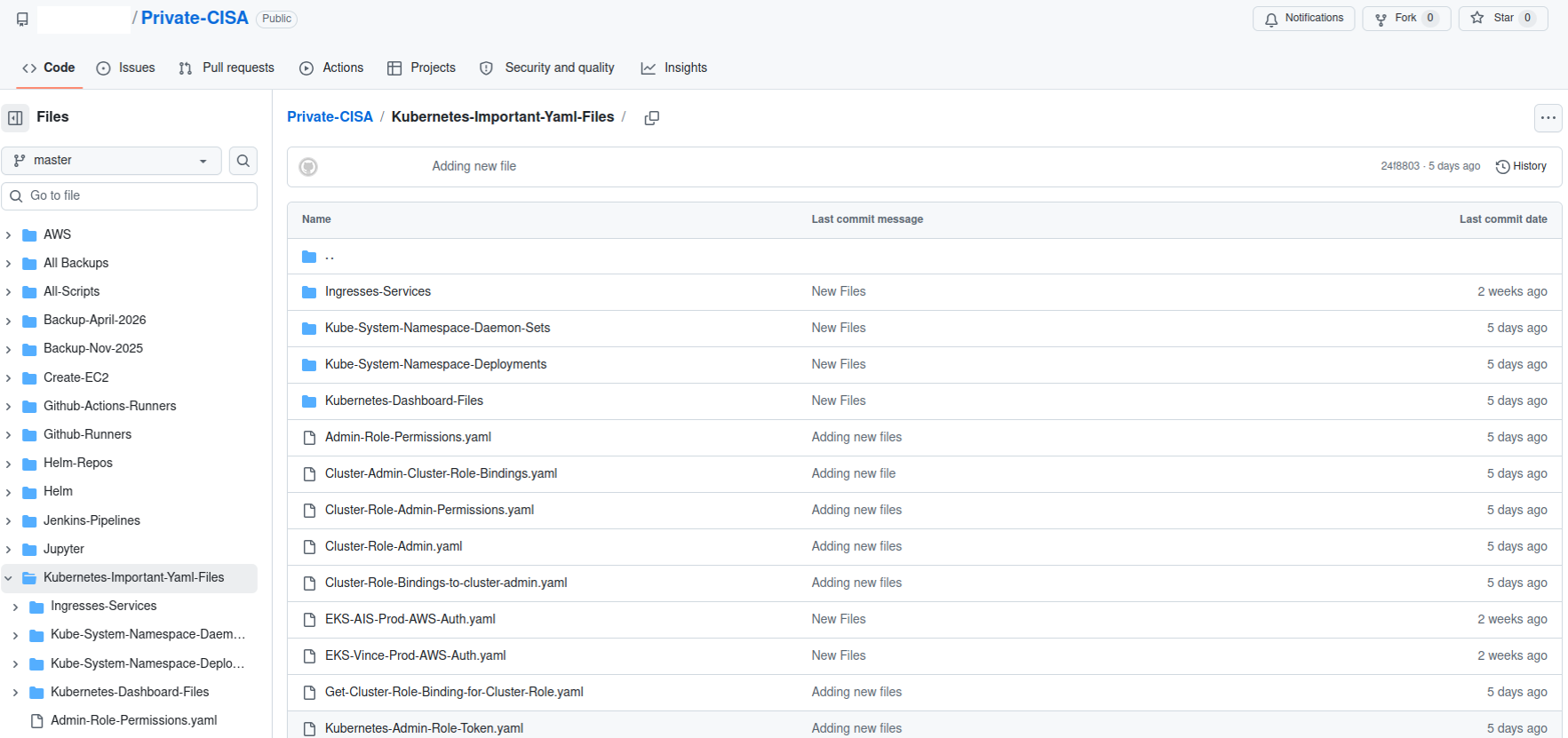
A redacted screenshot of the now-defunct “Private CISA” repository maintained by a CISA contractor.
The GitHub repository that Valadon flagged was named “Private-CISA,” and it harbored a vast number of internal CISA/DHS credentials and files, including cloud keys, tokens, plaintext passwords, logs and other sensitive CISA assets.
Valadon said the exposed CISA credentials represent a textbook example of poor security hygiene, noting that the commit logs in the offending GitHub account show that the CISA administrator disabled the default setting in GitHub that blocks users from publishing SSH keys or other secrets in public code repositories.
“Passwords stored in plain text in a csv, backups in git, explicit commands to disable GitHub secrets detection feature,” Valadon wrote in an email. “I honestly believed that it was all fake before analyzing the content deeper. This is indeed the worst leak that I’ve witnessed in my career. It is obviously an individual’s mistake, but I believe that it might reveal internal practices.”
One of the exposed files, titled “importantAWStokens,” included the administrative credentials to three Amazon AWS GovCloud servers. Another file exposed in their public GitHub repository — “AWS-Workspace-Firefox-Passwords.csv” — listed plaintext usernames and passwords for dozens of internal CISA systems. According to Caturegli, those system included one called “LZ-DSO,” which appears short for “Landing Zone DevSecOps,” the agency’s secure code development environment.
Philippe Caturegli, founder of the security consultancy Seralys, said he tested the AWS keys only to see whether they were still valid and to determine which internal systems the exposed accounts could access. Caturegli said the GitHub account that exposed the CISA secrets exhibits a pattern consistent with an individual operator using the repository as a working scratchpad or synchronization mechanism rather than a curated project repository.
“The use of both a CISA-associated email address and a personal email address suggests the repository may have been used across differently configured environments,” Caturegli observed. “The available Git metadata alone does not prove which endpoint or device was used.”
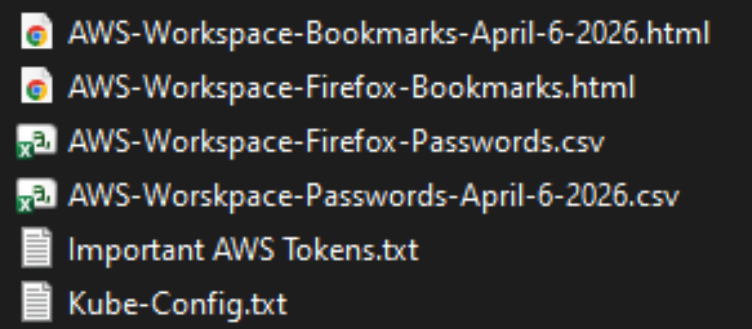
The Private CISA GitHub repo exposed dozens of plaintext credentials for important CISA GovCloud resources.
Caturegli said he validated that the exposed credentials could authenticate to three AWS GovCloud accounts at a high privilege level. He said the archive also includes plain text credentials to CISA’s internal “artifactory” — essentially a repository of all the code packages they are using to build software — and that this would represent a juicy target for malicious attackers looking for ways to maintain a persistent foothold in CISA systems.
“That would be a prime place to move laterally,” he said. “Backdoor in some software packages, and every time they build something new they deploy your backdoor left and right.”
In response to questions, a spokesperson for CISA said the agency is aware of the reported exposure and is continuing to investigate the situation.
“Currently, there is no indication that any sensitive data was compromised as a result of this incident,” the CISA spokesperson wrote. “While we hold our team members to the highest standards of integrity and operational awareness, we are working to ensure additional safeguards are implemented to prevent future occurrences.”
A review of the GitHub account and its exposed passwords show the “Private CISA” repository was maintained by an employee of Nightwing, a government contractor based in Dulles, Va. Nightwing declined to comment, directing inquiries to CISA.
CISA has not responded to questions about the potential duration of the data exposure, but Caturegli said the Private CISA repository was created on November 13, 2025. The contractor’s GitHub account was created back in September 2018.
The GitHub account that included the Private CISA repo was taken offline shortly after both KrebsOnSecurity and Seralys notified CISA about the exposure. But Caturegli said the exposed AWS keys inexplicably continued to remain valid for another 48 hours.
CISA is currently operating with only a fraction of its normal budget and staffing levels. The agency has lost nearly a third of its workforce since the beginning of the second Trump administration, which forced a series of early retirements, buyouts, and resignations across the agency’s various divisions.
The now-defunct Private CISA repo showed the contractor also used easily-guessed passwords for a number of internal resources; for example, many of the credentials used a password consisting of each platform’s name followed by the current year. Caturegli said such practices would constitute a serious security threat for any organization even if those credentials were never exposed externally, noting that threat actors often use key credentials exposed on the internal network to expand their reach after establishing initial access to a targeted system.
“What I suspect happened is [the CISA contractor] was using this GitHub to synchronize files between a work laptop and a home computer, because he has regularly committed to this repo since November 2025,” Caturegli said. “This would be an embarrassing leak for any company, but it’s even more so in this case because it’s CISA.”
Zero-Day Exploit Against Windows BitLocker
It’s nasty, but it requires physical access to the computer:
The exploit, named YellowKey, was published earlier this week by a researcher who goes by the alias Nightmare-Eclipse. It reliably bypasses default Windows 11 deployments of BitLocker, the full-volume encryption protection Microsoft provides to make disk contents off-limits to anyone without the decryption key, which is stored in a secured piece of hardware known as a trusted platform module (TPM). BitLocker is a mandatory protection for many organizations, including those that contract with governments...
The Proxy Died First: How Kubernetes Native Sidecars Solve the Service Mesh Shutdown Problem
If you’ve ever operated a service mesh on Kubernetes, you’ve probably seen something like this during a rolling deployment:
Unexpected error occurred: Client 'http://my-api:8080/': Connect Error:
Connection refused: my-api/100.20.100.200:8080
One second your pod is humming along, serving traffic, and talking to its
upstream dependencies through the mesh. The next second it enters Terminating
state, the sidecar proxy exits, and every in-flight request to a dependent
service gets a cold Connection refused in response.
Kubelet Metrics: How cAdvisor and CRI Collect Kubernetes Stats
Friday Squid Blogging: Bigfin Squid
Article about the bigfin squid.
As usual, you can also use this squid post to talk about the security stories in the news that I haven’t covered.
Kubernetes v1.36: New Metric for Route Sync in the Cloud Controller Manager
This article was originally published with the wrong date. It was later republished, dated the 15th of May 2026.
Kubernetes v1.36 introduces a new alpha counter metric route_controller_route_sync_total
to the Cloud Controller Manager (CCM) route controller implementation at
k8s.io/cloud-provider. This metric
increments each time routes are synced with the cloud provider.
A/B testing watch-based route reconciliation
This metric was added to help operators validate the
CloudControllerManagerWatchBasedRoutesReconciliation feature gate introduced in
Kubernetes v1.35.
That feature gate switches the route controller from a fixed-interval loop to a watch-based
approach that only reconciles when nodes actually change. This reduces unnecessary API calls
to the infrastructure provider, lowering pressure on rate-limited APIs and allowing operators
to make more efficient use of their available quota.
To A/B test this, compare route_controller_route_sync_total with the feature gate
disabled (default) versus enabled. In clusters where node changes are infrequent, you should
see a significant drop in the sync rate with the feature gate turned on.
Example: expected behavior
With the feature gate disabled (the default fixed-interval loop), the counter increments steadily regardless of whether any node changes occurred:
# After 10 minutes with no node changes
route_controller_route_sync_total 60
# After 20 minutes, still no node changes
route_controller_route_sync_total 120
With the feature gate enabled (watch-based reconciliation), the counter only increments when nodes are actually added, removed, or updated:
# After 10 minutes with no node changes
route_controller_route_sync_total 1
# After 20 minutes, still no node changes — counter unchanged
route_controller_route_sync_total 1
# A new node joins the cluster — counter increments
route_controller_route_sync_total 2
The difference is especially visible in stable clusters where nodes rarely change.
Where can I give feedback?
If you have feedback, feel free to reach out through any of the following channels:
- The #sig-cloud-provider channel on Kubernetes Slack
- The KEP-5237 issue on GitHub
- The SIG Cloud Provider community page for other communication channels
How can I learn more?
For more details, refer to KEP-5237.
Kubernetes v1.36: Mixed Version Proxy Graduates to Beta
Back in Kubernetes 1.28, we introduced the Mixed Version Proxy (MVP) as an Alpha feature (under the feature gate UnknownVersionInteroperabilityProxy) in a previous blog post. The goal was simple but critical: make cluster upgrades safer by ensuring that requests for resources not yet known to an older API server are correctly routed to a newer peer API server, instead of returning an incorrect 404 Not Found.
We are excited to announce that the Mixed Version Proxy is moving to Beta in Kubernetes 1.36 and will be enabled by default! The feature has evolved significantly since its initial release, addressing key gaps and modernizing its architecture.
Here is a look at how the feature has evolved and what you need to know to leverage it in your clusters.
What problem are we solving?
In a highly available control plane undergoing an upgrade, you often have API servers running different versions. These servers might serve different sets of APIs (Groups, Versions, Resources).
Without MVP, if a client request lands on an API server that does not serve the requested resource (e.g., a new API version introduced in the upgrade), that server returns a 404 Not Found. This is technically incorrect because the resource is available in the cluster, just not on that specific server. This can lead to serious side effects, such as mistaken garbage collection or blocked namespace deletions.
MVP solves this by proxying the request to a peer API server that can serve it.
How has it evolved since 1.28
The initial Alpha implementation was a great proof of concept, but it had some limitations and relied on older mechanisms. Here is how we have modernized it for Beta:
-
From StorageVersion API to Aggregated Discovery In the Alpha version, API servers relied on the
StorageVersion APIto figure out which peers served which resources. While functional, this approach had a significant limitation: theStorageVersion APIis not yet supported for CRDs and aggregated APIs. For Beta, we have replaced the reliance onStorageVersion APIcalls with the use ofAggregated Discovery. API servers now use the aggregated discovery data to dynamically understand the capabilities of their peers. -
The Missing Piece: Peer-Aggregated Discovery The 1.28 blog post noted a significant gap: while we could proxy resource requests, discovery requests still only showed what the local API server knew about. In 1.36, we have added
Peer-Aggregated Discoverysupport! Now, when a client performs discovery (e.g., listing available APIs), the API server merges its local view with the discovery data from all active peers. This provides clients with a complete, unified view of all APIs available across the entire cluster, regardless of which API server they connected to.
While peer-aggregated discovery will be the default behavior (note that peer-aggregated discovery is enabled if the --peer-ca-file flag is set, otherwise the server will fallback to showing only its local APIs), there may be cases where you need to inspect only the resources served by the specific API server you are connected to. You can request this non-aggregated view by including the profile=nopeer parameter in your request's Accept header (e.g., Accept: application/json;g=apidiscovery.k8s.io;v=v2;as=APIGroupDiscoveryList;profile=nopeer).
Required configuration
While the feature gate will be enabled by default, it requires certain flags to be set to allow for secure communication between peer API servers. To function correctly, make sure your API server is configured with the following flags:
--feature-gates=UnknownVersionInteroperabilityProxy=true: This will be default in 1.36, but it is good to verify--peer-ca-file=<path-to-ca>: [CRITICAL] This is a required flag. You must provide the CA bundle that the source API server will use to authenticate the serving certificates of destination peer API servers. Without this, proxying will fail due to TLS verification errors.--peer-advertise-ipand--peer-advertise-port: These flags are used to set the network address that peers should use to reach this API server. If unset, the values from--advertise-addressor--bind-addressare used. If you have complex network topologies where API servers communicate over a specific internal interface, setting these flags explicitly is highly recommended.
Configuring with kubeadm
If you manage your cluster with kubeadm, you can configure these flags in your ClusterConfiguration file:
apiVersion: kubeadm.k8s.io/v1beta4
kind: ClusterConfiguration
apiServer:
 extraArgs:
 peer-ca-file: "/etc/kubernetes/pki/ca.crt"
 # peer-advertise-ip and port if needed
Call to action
If you are running multi-master clusters and upgrading them regularly, the Mixed Version Proxy is a major safety improvement. With it becoming default in 1.36, we encourage you to:
- Review your API server flags to ensure
--peer-ca-fileis set properly. - Test the feature in your staging environments as you prepare for the 1.36 upgrade.
- Provide feedback to SIG API Machinery (Slack, mailing list, or by attending SIG API Machinery meetings) on your experience.
Bypassing On-Camera Age-Verification Checks
Some AI-based video age-verification checks can be fooled with a fake mustache.
Kubernetes v1.36: Deprecation and removal of Service ExternalIPs
The .spec.externalIPs field for Service was an early attempt to provide
cloud-load-balancer-like functionality for non-cloud clusters.
Unfortunately, the API assumes that every user in the cluster is fully
trusted, and in any situation where that is not the case, it enables
various security exploits, as described in
CVE-2020-8554.
Since Kubernetes 1.21, the Kubernetes project has recommended that all users disable
.spec.externalIPs. To make that easier, Kubernetes also added an admission controller
(DenyServiceExternalIPs) that can be enabled to do this. At the time,
SIG Network felt that blocking the functionality by default was too large a
breaking change to consider.
However, the security problems are still there, and as a project we're increasingly unhappy with the "insecure by default" state of the feature. Additionally, there are now several better alternatives for non-cloud clusters wanting load-balancer-like functionality.
As a result, the .spec.externalIPs field for Service is now formally deprecated in Kubernetes 1.36.
We expect that a future minor release of Kubernetes will drop
implementation of the behavior from kube-proxy, and will update the
Kubernetes conformance criteria to require that conforming implementations
do not provide support.
A note on terminology, and what hasn't been deprecated
The phrase external IP is somewhat overloaded in Kubernetes:
-
The Service API has a field
.spec.externalIPsthat can be used to add additional IP addresses that a Service will respond on. -
The Node API's
.status.addressesfield can list addresses of several different types, one of which is calledExternalIP. -
The
kubectltool, when displaying information about a Service of type LoadBalancer in the default output format, will show the load balancer IP address under the column headingEXTERNAL-IP.
This deprecation is about the first of those. If you are not setting
the field externalIPs in any of your Services, then it does not
apply to you.
That said, as a precaution, you may still want to enable the DenyServiceExternalIPs admission controller to
block any future use of the externalIPs field.
Alternatives to externalIPs
If you are using .spec.externalIPs, then there are several alternatives.
Consider a Service like the following:
apiVersion: v1
kind: Service
metadata:
 name: my-example-service
spec:
 type: ClusterIP
 selector:
 app.kubernetes.io/name: my-example-app
 ports:
 - protocol: TCP
 port: 80
 targetPort: 8080
 externalIPs:
 - "192.0.2.4"
Using manually-managed LoadBalancer Services instead of externalIPs
The easiest (but also worst) option is to just switch from using
externalIPs to using a type: LoadBalancer service, and assigning a
load balancer IP by hand. This is, essentially, exactly the same as
externalIPs, with one important difference: the load balancer IP is
part of the Service's .status, not its .spec, and in a cluster
with RBAC enabled, it can't be edited by ordinary users by default.
Thus, this replacement for externalIPs would only be available to
users who were given permission by the admins (although those users
would then be fully empowered to replicate CVE-2020-8554; there would
still not be any further checks to ensure that one user wasn't
stealing another user's IPs, etc.)
Because of the way that .status works in Kubernetes, you must create the
Service without a load balancer IP, and then add the IP as a second step:
$ cat loadbalancer-service.yaml
apiVersion: v1
kind: Service
metadata:
 name: my-example-service
spec:
 # prevent any real load balancer controllers from managing this service
 # by using a non-existent loadBalancerClass
 loadBalancerClass: non-existent-class
 type: LoadBalancer
 selector:
 app.kubernetes.io/name: my-example-app
 ports:
 - protocol: TCP
 port: 80
 targetPort: 8080
$ kubectl apply -f loadbalancer-service.yaml
service/my-example-service created
$ kubectl patch service my-example-service --subresource=status --type=merge -p '{"status":{"loadBalancer":{"ingress":[{"ip":"192.0.2.4"}]}}}'
Using a non-cloud based load balancer controller
Although LoadBalancer services were originally designed to be backed by
cloud load balancers, Kubernetes can also support them on non-cloud platforms
by using a third-party load balancer controller such as MetalLB.
This solves the security problems associated with externalIPs because the
administrator can configure what ranges of IP addresses the controller will assign
to services, and the controller will ensure that two services can't both use the same
IP.
So, for example, after installing and configuring MetalLB, a cluster administrator could configure a pool of IP addresses for use in the cluster:
apiVersion: metallb.io/v1beta1
kind: IPAddressPool
metadata:
 name: production
 namespace: metallb-system
spec:
 addresses:
 - 192.0.2.0/24
 autoAssign: true
 avoidBuggyIPs: false
After which a user can create a type: LoadBalancer Service and MetalLB will handle the
assignment of the IP address. MetalLB even supports the deprecated loadBalancerIP
field in Service, so the end user can request a specific IP (assuming it is available)
for backward-compatibility with the externalIPs approach, rather than being
assigned one at random:
apiVersion: v1
kind: Service
metadata:
 name: my-example-service
spec:
 type: LoadBalancer
 selector:
 app.kubernetes.io/name: my-example-app
 ports:
 - protocol: TCP
 port: 80
 targetPort: 8080
 loadBalancerIP: "192.0.2.4"
Similar approaches would work with other load balancer controllers. This approach can allow cluster administrators to have control over which IP addresses are assigned, rather than users.
Using Gateway API
Another potential solution is to use an implementation of the Gateway API.
Gateway API allows cluster administrators to define a Gateway resource, which can have an IP address
attached to it via the .spec.addresses field. Since Gateway resources are designed to be managed by
cluster administrators, RBAC rules can be put in place to only allow privileged users to manage them.
An example of how this could look is:
apiVersion: gateway.networking.k8s.io/v1
kind: Gateway
metadata:
 name: example-gateway
spec:
 gatewayClassName: example-gateway-class
 addresses:
 - type: IPAddress
 value: "192.0.2.4"
---
apiVersion: gateway.networking.k8s.io/v1
kind: HTTPRoute
metadata:
 name: example-route
spec:
 parentRefs:
 - name: example-gateway
 rules:
 - backendRefs:
 - name: example-svc
 port: 80
---
apiVersion: v1
kind: Service
metadata:
 name: example-svc
spec:
 type: ClusterIP
 selector:
 app.kubernetes.io/name: example-app
 ports:
 - protocol: TCP
 port: 80
 targetPort: 8080
The Gateway API project is the next generation of Kubernetes Ingress, Load Balancing, and Service Mesh APIs within Kubernetes. Gateway API was designed to fix the shortcomings of the Service and Ingress resource, making it a very reliable robust solution that is under active development.
Timeline for externalIPs deprecation
The rough timeline for this deprecation is as follows:
- With the release of Kubernetes 1.36, the field was deprecated; Kubernetes now emits warnings when a user uses this field
- About a year later (v1.40 at the earliest) support for
.spec.externalIPswill be disabled in kube-proxy, but users will have a way to opt back in should they require more time to migrate away - About another year later - (v1.43 at the earliest) support will be disabled completely; users won't have a way to opt back in
Upcoming Speaking Engagements
This is a current list of where and when I am scheduled to speak:
- I’m giving a virtual talk on “The Security of Trust in the Age of AI,” hosted by the Financial Women’s Association of New York, at 6:00 PM ET on May 21, 2026.
- I’m speaking at the Potsdam Conference on National Cybersecurity at the Hasso Plattner Institut in Potsdam, Germany. The event runs June 24–25, 2026, and my talk will be the evening of June 24.
- I’m speaking at the Digital Humanism Conference in Vienna, Austria, on Tuesday, June 26, 2026.
- I’m speaking at the ...
How Dangerous Is Anthropic’s Mythos AI?
Last month, Anthropic made a remarkable announcement about its new model, Claude Mythos Preview: it was so good at finding security vulnerabilities in software that the company would not release it to the general public. Instead, it would only be available to a select group of companies to scan and fix their own software.
The announcement requires context—but it contained an essential truth.
While Anthropic’s model is really good at finding software vulnerabilities, so are other models. The UK’s AI Security Institute found that OpenAI’s GPT-5.5, already generally available, is comparable in capability. The company Aisle ...
When AI agents become contributors: How KubeStellar reached 81% PR acceptance
In mid-December, I started building KubeStellar Console from scratch. It’s a multi-cluster management dashboard for Kubernetes, and it sits inside the KubeStellar project in the Cloud Native Computing Foundation (CNCF) Sandbox. The stack is Go on the back end, React and TypeScript on the front, and Helm for packaging. No team. Just me and two AI coding agents running in parallel terminal sessions.
The first two weeks were the honeymoon that everyone in this space seems to describe. Code came out of the agents faster than I could read it. Things I’d have budgeted three days for showed up in two hours. I kept a mental list of features I’d always wanted to build and just kept calling them off, one after another.
Then it struck.
Builds broke in ways that were hard to trace. Architectural choices from the day before quietly got overwritten. Scope expanded without being asked. The agent kept touching files I hadn’t pointed it toward, and the cascade problem was the worst of it—fix one thing, then three others broke. I started spending more time reverting than reviewing. The promised 10x started to feel like a net negative, and I decided to scrap the whole approach.
The surprise in building KubeStellar Console with coding agents was not the extent of the model’s capabilities, but the heavy lifting the surrounding codebase had to perform.
That arc, from euphoria to grinding frustration, is apparently universal. The usual industry advice is to hand the agent more autonomy: let it run longer, touch more files, and self-correct. In my experience, that tends to make the failure mode worse, not better. The leverage runs in the opposite direction. The intelligence in an AI-assisted codebase lives less in the model and more in the loops the codebase wraps around it. If you want the agent to do more, the surrounding code has to measure more.
Four months on, and KubeStellar Console is now in better shape. There are 63 CI/CD workflows, 32 nightly test suites, and coverage sitting at 91% across twelve shards. Across 82 days, PR acceptance settled around 81%. Community bug reports are moving to merged fixes in roughly thirty minutes. Feature requests are landing as pull requests in about an hour. None of that was the result of a better model. What changed was what the code itself had learned to measure.
Five tightening loops got me there. I think of them as the rungs of what I’ve been calling the AI Codebase Maturity Model—Assisted, Instructed, Measured, Adaptive, and Self-Sustaining. I’ll walk through them in the order they appeared, because I don’t think they can be reordered.
1. Write down what you keep correcting (instructed)
The cheapest intervention, and probably the highest return, is to externalize your own preferences. I started with a CLAUDE.md at the root of the repo, followed by a .github/copilot-instructions.md file for pull request conventions. Next came a card-level development guide that cataloged the top reasons I was rejecting AI-generated PRs.
That one guide wound up covering about 90% of my rejection criteria. Sessions became more consistent. The same mistakes stopped recurring across agents. I wouldn’t call this measurement — at this point, I was still running on intuition — but it filtered out enough noise for a standard measurement to become possible.
2. Treat tests as the trust layer, not just the correctness layer (measured)
This was the turn that mattered most. Testing for an autonomous workflow differs from testing for a human workflow. It’s the only signal the agent has to know whether it’s making the system better or worse.
Over four weeks, I added 32 nightly suites and pushed coverage to 91% across twelve parallel shards. The suites covered compliance, performance, nil safety, accessibility, internationalization, and visual regression. Alongside that, I started logging PR acceptance rates per category into auto-qa-tuning.json. That file turned out to be load-bearing for everything that followed.
Coverage volume matters. So does breadth. But the thing that nearly undid me, and that I’d flag hardest for anyone attempting this, is determinism.
“A flaky test in a human workflow is an annoyance. In an autonomous one, it’s a slow, quiet erosion of the entire trust model.”
One Playwright end-to-end test for drag-and-drop passed about 85% of the time. In a human workflow, that’s tolerable; you re-run it, you move on. In an autonomous workflow where test results gate merges, an 85% test is a disaster. Good PRs were being blocked at random, and weak ones were being let through. I spent three days on that single test, and it turned out to be an animation-completion timing issue in CI. The lesson generalized. You can’t build automation on top of an unreliable signal. A flaky test in a human workflow is an annoyance. In an autonomous one, it’s a slow, quiet erosion of the entire trust model.
3. Don’t automate until you can measure (adaptive)
With acceptance rates being logged, automation became a safer proposition. Auto-QA started running four times a day across eight layers of quality checks. The rotation weights that decide which categories of work the system focuses on began adjusting themselves based on the data. Accessibility PRs were landing at 62% acceptance, so their weight went up to 0.93. Operator-category PRs were landing at 8% (11 merges against 129 closed), so that weight dropped to zero and CI cycles got redirected.
A few more loops closed around that core:
- A triage process scanned four repositories every 15 minutes.
- A PR monitor polled build status every 60 seconds.
- An error-recovery workflow used exponential backoff to handle stuck agents.
- A GA4 query ran hourly against production analytics and filed GitHub issues for error spikes before users reported them.
“Automation without measurement isn’t maturity — it’s failure at scale.”
The pattern across all of these is the same: measurement first, automation second. Inverting the order is how autonomous systems go off the rails. Automation without measurement isn’t maturity — it’s failure at scale.
4. Let the codebase become the operating manual (self-sustaining)
At some point, and I can’t point to a specific day, the system stopped needing me in the loop to operate. Its behavior was being determined by its artifacts: the instruction files, the tests, the workflow rules, and the acceptance rate history. The community started opening issues at all hours, and those issues were being triaged, assigned, fixed, tested, and queued for review before I even woke up.
One case crystallized the shift. In April, a user filed a bug reporting that a cluster was marked “healthy” while pods were stuck in ImagePullBackOff. Before I looked at it, the system had already answered that cluster health reflects infrastructure health (node readiness, API reachability), which is architecturally separate from workload health. It wasn’t a bug. It was a Kubernetes mental model that didn’t quite map to what the dashboard was showing. The design decision was already encoded in the tests, in the health-check logic, and in the docs; the agent could explain it because the codebase already knew it.
That, more than any throughput number, is what “the code is the model” actually looks like in practice.
5. Ask “why,” not “what”
One prompting habit did disproportionate work. Instead of “fix this bug,” I started asking, “Why didn’t you catch this?” The first phrasing produces a patch. The second tends to produce a root-cause analysis and, as a side effect, a new test, instruction, or rule that blocks an entire class of similar failures.
Commanding gets you a sequence of isolated fixes. Questioning compounds. Over time, the questions are what turn the codebase into a self-improving system, and they’re what produce the instruction files in the first place if you’re starting from scratch.
What this might mean for maintainers and leaders
If you’re leading engineering, stop optimizing for which model you’re using. The model is a commodity component, and swapping one for another is a weekend of work. Rebuilding the surrounding feedback system is a quarter of the work. The differentiation is the intelligence infrastructure: the instruction files, the test suites, the metrics, and the workflow rules.
For open source maintainers, this directly addresses the burnout problem that keeps surfacing in CNCF community conversations. If a codebase can encode enough of a maintainer’s judgment that agents can handle triage, generate pull requests, and explain design decisions to users, then the community can steer the project primarily by filing issues.
Maintainers become architects of the system rather than its daily operators. That’s not hypothetical for KubeStellar Console. It’s working now. Whether it scales beyond a solo-maintained Sandbox project is something the broader community will need to test. I’d genuinely like to know.
Most teams are still in the first loop, writing prompts and reviewing output. That’s where everyone starts. The point isn’t to race to the last loop. The point is to notice which loop is actually blocking you and close that one next.
The codebase holds what I’ve learned. The tests catch what I can’t keep in my head. What’s still mine — and I think this part stays mine — is deciding what’s worth building, what to say no to, and what good is supposed to look like.
The E-commerce Industry in the AI Era: Has the Agentic Flood Hit?
How Wasm components enable pluggable tooling through interposition
Kubernetes v1.36: Advancing Workload-Aware Scheduling
AI/ML and batch workloads introduce unique scheduling challenges that go beyond simple Pod-by-Pod scheduling. In Kubernetes v1.35, we introduced the first tranche of workload-aware scheduling improvements, featuring the foundational Workload API alongside basic gang scheduling support built on a Pod-based framework, and an opportunistic batching feature to efficiently process identical Pods.
Kubernetes v1.36 introduces a significant architectural evolution by cleanly separating API concerns:
the Workload API acts as a static template, while the new PodGroup API handles the runtime state.
To support this, the kube-scheduler features a new PodGroup scheduling cycle that enables atomic workload processing
and paves the way for future enhancements. This release also debuts the first iterations of topology-aware scheduling
and workload-aware preemption to advance scheduling capabilities. Additionally,
ResourceClaim support for workloads unlocks Dynamic Resource Allocation
(DRA) for PodGroups. Finally,
to demonstrate real-world readiness, v1.36 delivers the first phase of integration between the Job controller and the new API.
Workload and PodGroup API updates
The Workload API now serves as a static template, while the new PodGroup API describes the runtime object.
Kubernetes v1.36 introduces the Workload and PodGroup APIs as part of the
scheduling.k8s.io/v1alpha2 API group,
completely replacing the previous v1alpha1 API version.
In v1.35, Pod groups and their runtime states were embedded within the Workload resource. The new model decouples these concepts: the Workload now serves as a static template object, while the PodGroup manages the runtime state. This separation also improves performance and scalability as the PodGroup API allows per-replica sharding of status updates.
Because the Workload API acts merely as a template, the kube-scheduler's logic is streamlined.
The scheduler can directly read the PodGroup, which contains all the information required by the scheduler,
without needing to watch or parse the Workload object itself.
Here is what the updated configuration looks like. Workload controllers (such as the Job controller) define the Workload object, which now acts as a static template for your Pod groups:
apiVersion: scheduling.k8s.io/v1alpha2
kind: Workload
metadata:
 name: training-job-workload
 namespace: some-ns
spec:
 # Pod groups are now defined as templates,
 # which contains the PodGroup objects' spec fields.
 podGroupTemplates:
 - name: workers
 schedulingPolicy:
 gang:
 # The gang is schedulable only if 4 pods can run at once
 minCount: 4
Controllers then stamp out runtime PodGroup instances based on those templates. The PodGroup runtime object holds the actual scheduling policy and references the template from which it was created. It also has a status containing conditions that mirror the states of individual Pods, reflecting the overall scheduling state of the group:
apiVersion: scheduling.k8s.io/v1alpha2
kind: PodGroup
metadata:
 name: training-job-workers-pg
 namespace: some-ns
spec:
 # The PodGroup references the Workload template it originated from.
 # In comparison, .metadata.ownerReferences points to the "true" workload object,
 # e.g., a Job.
 podGroupTemplateRef:
 workload:
 workloadName: training-job-workload
 podGroupTemplateName: workers
 # The actual scheduling policy is placed inside the runtime PodGroup
 schedulingPolicy:
 gang:
 minCount: 4
status:
 # The status contains conditions mirroring individual Pod conditions.
 conditions:
 - type: PodGroupScheduled
 status: "True"
 lastTransitionTime: 2026-04-03T00:00:00Z
Finally, to bridge this new architecture with individual Pods, the workloadRef field in the Pod API has been replaced
with the schedulingGroup field. When creating Pods, you link them directly to the runtime PodGroup:
apiVersion: v1
kind: Pod
metadata:
 name: worker-0
 namespace: some-ns
spec:
 # The workloadRef field has been replaced by schedulingGroup
 schedulingGroup:
 podGroupName: training-job-workers-pg
 ...
By keeping the Workload as a static template and elevating the PodGroup to a first-class, standalone API, we establish a robust foundation for building advanced workload scheduling capabilities in future Kubernetes releases.
PodGroup scheduling cycle and gang scheduling
To efficiently manage these workloads, the kube-scheduler now features a dedicated PodGroup scheduling cycle. Instead of evaluating and reserving resources sequentially Pod-by-Pod, which risks scheduling deadlocks, the scheduler evaluates the group as a unified operation.
When the scheduler pops a PodGroup member from the scheduling queue, regardless of the group's specific policy, it fetches the rest of the queued Pods for that group, sorts them deterministically, and executes an atomic scheduling cycle as follows:
-
The scheduler takes a single snapshot of the cluster state to prevent race conditions and ensure consistency while evaluating the entire group.
-
It then attempts to find valid Node placements for all Pods in the group using a PodGroup scheduling algorithm, which leverages the standard Pod-based filtering and scoring phases.
-
Based on the algorithm's outcome, the scheduling decision is applied atomically for the entire PodGroup.
-
Success: If the placement is found and group constraints are met, the schedulable member Pods are moved directly to the binding phase together. Any remaining unschedulable Pods are returned to the scheduling queue to wait for available resources so they can join the already scheduled Pods.
(Note: If new Pods are added to a PodGroup after others are already scheduled, the cycle evaluates the new Pods while accounting for the existing ones. Crucially, Pods already assigned to Nodes remain running. The scheduler will not unassign or evict them, even if the group fails to meet its requirements in subsequent cycles.)
-
Failure: If the group fails to meet its requirements, the entire group is considered unschedulable. None of the Pods are bound, and they are returned to the scheduling queue to retry later after a backoff period.
-
This cycle acts as the foundation for gang scheduling. When your workload requires strict all-or-nothing placement,
the gang policy leverages this cycle to prevent partial deployments that lead to resource wastage and potential deadlocks.
While the scheduler still holds the Pods in the PreEnqueue until the minCount requirement is met, the actual scheduling phase now relies entirely
on the new PodGroup cycle. Specifically, during the algorithm's execution, the scheduler verifies
that the number of schedulable Pods satisfies the minCount. If the cluster cannot accommodate the required minimum,
none of the pods are bound. The group fails and waits for sufficient resources to free up.
Limitations
The first version of the PodGroup scheduling cycle comes with certain limitations:
-
For basic homogeneous Pod groups (i.e., those where all Pods have identical scheduling requirements and lack inter-Pod dependencies like affinity, anti-affinity, or topology spread constraints), the algorithm is expected to find a placement if one exists.
-
For heterogeneous Pod groups, finding a valid placement if one exists is not guaranteed, even when the solution might seem trivial.
-
For Pod groups with inter-Pod dependencies, finding a valid placement if one exists is not guaranteed.
In addition to the above, for cases involving intra-group dependencies (e.g., when the schedulability of one Pod depends on another group member via inter-Pod affinity), this algorithm may fail to find a placement regardless of cluster state due to its deterministic processing order.
Topology-aware scheduling
For complex distributed workloads like AI/ML training or batch processing, placing Pods randomly across a cluster can introduce significant network latency and bottleneck overall performance.
Topology-aware scheduling addresses this problem by allowing you to define topology constraints directly on a PodGroup, ensuring its Pods are co-located within specific physical or logical domains:
apiVersion: scheduling.k8s.io/v1alpha2
kind: PodGroup
metadata:
 name: topology-aware-workers-pg
spec:
 schedulingPolicy:
 gang:
 minCount: 4
 # Enforce that the pods are co-located based on the rack topology
 schedulingConstraints:
 topology:
 - key: topology.kubernetes.io/rack
In this example, the kube-scheduler attempts to schedule the Pods across various combinations of Nodes
that match the rack topology constraint. It then selects the optimal placement based on how efficiently
the PodGroup utilizes resources and how many Pods can successfully be scheduled within that domain.
To achieve this, the scheduler extends the PodGroup scheduling cycle with a dedicated placement-based algorithm consisting of three phases:
-
Generate candidate placements (subsets of Nodes that are theoretically feasible for the PodGroup's assignment) based on the group's scheduling constraints. The topology-aware scheduling plugin uses the new
PlacementGenerateextension point to create these placements. -
Evaluate each proposed placement to confirm whether the entire PodGroup can actually fit there.
-
Score all feasible placements to select the best fit for the PodGroup. The topology-aware scheduling plugins use the new
PlacementScoreextension point to score these placements.
Currently, topology-aware scheduling does not trigger Pod preemption to satisfy constraints. However, we plan to integrate workload-aware preemption with topology constraints in the upcoming release.
While Kubernetes v1.36 delivers this foundational topology-aware scheduling, the Kubernetes project is planning
expand its capabilities soon. Future updates will introduce support for multiple topology levels,
soft constraints (preferences), deeper integration with Dynamic Resource Allocation (DRA),
and more robust behavior when paired with the basic scheduling policy.
Workload-aware preemption
To support the new PodGroup scheduling cycle, Kubernetes v1.36 introduces a new type of preemption mechanism called workload-aware preemption. When a PodGroup cannot be scheduled, the scheduler utilizes this mechanism to try making a scheduling of this PodGroup possible.
Compared to the default preemption used in the standard Pod-by-Pod scheduling cycle, this new mechanism treats the entire PodGroup as a single preemptor unit. Instead of evaluating preemption victims on each Node separately, it searches across the entire cluster. This allows the scheduler to preempt Pods from multiple Nodes simultaneously, making enough space to schedule the whole PodGroup afterwards.
Workload-aware preemption also introduces two additional concepts directly to the PodGroup API:
-
PodGroup
prioritythat overrides the priority of the individual Pods forming the PodGroup. -
PodGroup
disruptionModethat dictates whether the Pods within a PodGroup can be preempted independently, or if they have to be preempted together in an all-or-nothing fashion.
In Kubernetes v1.36, these fields are only respected by the workload-aware preemption mechanism. The people working on this set of features are hoping to extend support for these fields to other disruption sources, including default preemption used in the Pod-by-Pod scheduling cycle, in future releases.
apiVersion: scheduling.k8s.io/v1alpha2
kind: PodGroup
metadata:
 name: victim-pg
spec:
 priorityClassName: high-priority
 priority: 1000
 disruptionMode: PodGroup
In this example, when the scheduler evaluates victim-pg as a potential preemption victim
during a workload-aware preemption cycle, it will use 1000 as its priority and preempt the PodGroup
in a strictly all-or-nothing fashion.
DRA ResourceClaim support for workloads
Since its general availability in Kubernetes v1.34, DRA has enabled Pods to make detailed requests for devices like GPUs, TPUs, and NICs. Requested devices can be shared by multiple Pods requesting the same ResourceClaim by name. Other requests can be replicated through a ResourceClaimTemplate, in which Kubernetes generates one ResourceClaim with a non-deterministic name for each Pod referencing the template. However, large-scale workloads that require certain Pods to share certain devices are currently left to manage creating individual ResourceClaims themselves.
Now, in addition to Pods, PodGroups can represent the replicable unit for a
ResourceClaimTemplate. For ResourceClaimTemplates referenced by one of a
PodGroup's spec.resourceClaims, Kubernetes generates one ResourceClaim for the
entire PodGroup, no matter how many Pods are in the group. When one of a Pod's
spec.resourceClaims for a ResourceClaimTemplate matches one of its PodGroup's
spec.resourceClaims, the Pod's claim resolves to the ResourceClaim generated
for the PodGroup and a ResourceClaim will not be generated for that individual
Pod. A single PodGroupTemplate in a Workload object can express resource
requests which are both copied for each distinct PodGroup and shareable by the
Pods within each group.
The following example shows two Pods requesting the same ResourceClaim generated from a ResourceClaimTemplate for their PodGroup:
apiVersion: scheduling.k8s.io/v1alpha2
kind: PodGroup
metadata:
 name: training-job-workers-pg
spec:
 ...
 resourceClaims:
 - name: pg-claim
 resourceClaimTemplateName: my-claim-template
---
apiVersion: v1
kind: Pod
metadata:
 name: topology-aware-workers-pg-pod-1
spec:
 ...
 schedulingGroup:
 podGroupName: training-job-workers-pg
 resourceClaims:
 - name: pg-claim
 resourceClaimTemplateName: my-claim-template
---
apiVersion: v1
kind: Pod
metadata:
 name: topology-aware-workers-pg-pod-2
spec:
 ...
 schedulingGroup:
 podGroupName: training-job-workers-pg
 resourceClaims:
 - name: pg-claim
 resourceClaimTemplateName: my-claim-template
In addition, ResourceClaims referenced by PodGroups, either through
resourceClaimName or the claim generated from resourceClaimTemplateName,
become reserved for the entire PodGroup. Previously, kube-scheduler could only
list individual Pods in a ResourceClaim's status.reservedFor field which is
limited to 256 items. Now, a single PodGroup reference in status.reservedFor
can represent many more than 256 Pods, allowing high-cardinality sharing of
devices.
Together, these changes enable massive workloads with complex topologies to utilize DRA for scalable device management.
Integration with the Job controller
In Kubernetes v1.36, the Job controller can create and manage Workload and PodGroup objects on your behalf, so that Jobs representing a tightly coupled parallel application, such as distributed AI training, are gang-scheduled without any additional tooling. Without this integration, you would have to create the Workload and PodGroup yourself and wire their references into the Pod template. Now, the Job controller automates this process natively.
When the WorkloadWithJob
feature gate is enabled, the Job controller automatically:
-
creates a Workload and a corresponding runtime PodGroup for each qualifying Job,
-
sets
.spec.schedulingGrouponto every Pod the Job creates so the scheduler treats them as a single gang, and -
sets the Job as the owner of the generated objects, so they are garbage-collected when the Job is deleted.
When does the integration kick in?
To keep the first feature iteration predictable, the Job controller only creates a Workload and PodGroup when the Job has a well-defined, fixed shape:
-
.spec.parallelismis greater than 1 -
.spec.completionModeis set toIndexed -
.spec.completionsis equal to.spec.parallelism -
The
schedulingGroupis not already set on the Pod template.
These conditions describe the class of Jobs that gang scheduling can reason about:
each Pod has a stable identity (Indexed), the gang size is known and fixed at admission time
(parallelism == completions), and no other controller has already claimed scheduling responsibility
(schedulingGroup field is unset). Jobs that do not meet these conditions are scheduled Pod-by-Pod,
exactly as before.
If you set schedulingGroup on the Pod template yourself (for example,
because a higher-level controller is managing the workload), the Job controller leaves
the Pod template alone and does not create its own Workload or PodGroup. This makes the feature
safe to enable in clusters that already use an external batch system.
Here is an example of a Job that qualifies for gang scheduling:
apiVersion: batch/v1
kind: Job
metadata:
 name: training-job
 namespace: job-ns
spec:
 completionMode: Indexed
 parallelism: 4
 completions: 4
 template:
 spec:
 restartPolicy: Never
 containers:
 - name: worker
 image: registry.example/trainer:latest
The Job controller creates a Workload and a PodGroup owned by this Job,
and every Pod it creates carries a .spec.schedulingGroup that points at the generated PodGroup.
The Pods are then scheduled together once all four can be placed at the same time using
the PodGroup scheduling cycle described earlier in this post.
What's not covered yet
The current constraints limit this integration to static, indexed, fully-parallel Jobs. Support for additional workload shapes, including elastic Jobs and other built-in controllers, is tracked in KEP-5547.
In future Kubernetes releases, this integration will expand to support additional workload controllers, and the current constraints for Jobs may be relaxed.
What's next?
The journey for workload-aware scheduling doesn't stop here. For v1.37, the community is actively working on:
-
Graduating Workload and PodGroup APIs to Beta: Our primary goal is to mature the Workload and PodGroup APIs to the Beta stage, solidifying their foundational role in the Kubernetes ecosystem. As part of this graduation process, we also plan to introduce
minCountmutability to unlock elastic jobs and allow dynamic workloads to scale efficiently. -
Multi-level Workload hierarchies: To support complex modern AI workloads like JobSet or Disaggregated Inference via LeaderWorkerSet (LWS), we are working on expanding the architecture to support multi-level hierarchies. We aim to introduce a new API that allows grouping multiple PodGroups into hierarchical structures, directly reflecting the organization of real-world workload controllers.
-
Graduating advanced scheduling features: We are focused on driving the maturity of the broader workload-aware scheduling ecosystem. This includes bringing existing features, such as topology-aware scheduling and workload-aware preemption, to the Beta stage.
-
Unified controller integration API: To streamline adoption, we’re working on a controller integration API. This will provide real-world workload controllers with a unified, standardized method for consuming workload-aware scheduling capabilities.
The priority and implementation order of these focus areas are subject to change. Stay tuned for further updates.
Getting started
All below workload-aware scheduling improvements are available as Alpha features in v1.36. To try them out, you must configure the following:
- Prerequisite: Workload and PodGroup API support: Enable the
GenericWorkloadfeature gate on both thekube-apiserverandkube-scheduler, and ensure thescheduling.k8s.io/v1alpha2API group is enabled.
Once the prerequisite is met, you can enable specific features:
- Gang scheduling: Enable the
GangSchedulingfeature gate on thekube-scheduler. - Topology-aware scheduling: Enable the
TopologyAwareWorkloadSchedulingfeature gate on thekube-scheduler. - Workload-aware preemption: Enable the
WorkloadAwarePreemptionfeature gate on thekube-scheduler(requiresGangSchedulingto also be enabled). - DRA ResourceClaim support for workloads: Enable the
DRAWorkloadResourceClaimsfeature gate on thekube-apiserver,kube-controller-manager,kube-schedulerandkubelet. - Workload API integration with the Job controller: Enable the
WorkloadWithJobfeature gate on thekube-apiserverandkube-controller-manager.
We encourage you to try out workload-aware scheduling in your test clusters and share your experiences to help shape the future of Kubernetes scheduling. You can send your feedback by:
- Reaching out via Slack (#workload-aware-scheduling).
- Joining the SIG Scheduling meetings.
- Filing a new issue in the Kubernetes repository.
Learn more
To dive deeper into the architecture and design of these features, read the KEPs:
Kubernetes v1.36: Advancing Workload-Aware Scheduling
AI/ML and batch workloads introduce unique scheduling challenges that go beyond simple Pod-by-Pod scheduling. In Kubernetes v1.35, we introduced the first tranche of workload-aware scheduling improvements, featuring the foundational Workload API alongside basic gang scheduling support built on a Pod-based framework, and an opportunistic batching feature to efficiently process identical Pods.
Kubernetes v1.36 introduces a significant architectural evolution by cleanly separating API concerns:
the Workload API acts as a static template, while the new PodGroup API handles the runtime state.
To support this, the kube-scheduler features a new PodGroup scheduling cycle that enables atomic workload processing
and paves the way for future enhancements. This release also debuts the first iterations of topology-aware scheduling
and workload-aware preemption to advance scheduling capabilities. Additionally,
ResourceClaim support for workloads unlocks Dynamic Resource Allocation
(DRA) for PodGroups. Finally,
to demonstrate real-world readiness, v1.36 delivers the first phase of integration between the Job controller and the new API.
Workload and PodGroup API updates
The Workload API now serves as a static template, while the new PodGroup API describes the runtime object.
Kubernetes v1.36 introduces the Workload and PodGroup APIs as part of the
scheduling.k8s.io/v1alpha2 API group,
completely replacing the previous v1alpha1 API version.
In v1.35, Pod groups and their runtime states were embedded within the Workload resource. The new model decouples these concepts: the Workload now serves as a static template object, while the PodGroup manages the runtime state. This separation also improves performance and scalability as the PodGroup API allows per-replica sharding of status updates.
Because the Workload API acts merely as a template, the kube-scheduler's logic is streamlined.
The scheduler can directly read the PodGroup, which contains all the information required by the scheduler,
without needing to watch or parse the Workload object itself.
Here is what the updated configuration looks like. Workload controllers (such as the Job controller) define the Workload object, which now acts as a static template for your Pod groups:
apiVersion: scheduling.k8s.io/v1alpha2
kind: Workload
metadata:
 name: training-job-workload
 namespace: some-ns
spec:
 # Pod groups are now defined as templates,
 # which contains the PodGroup objects' spec fields.
 podGroupTemplates:
 - name: workers
 schedulingPolicy:
 gang:
 # The gang is schedulable only if 4 pods can run at once
 minCount: 4
Controllers then stamp out runtime PodGroup instances based on those templates. The PodGroup runtime object holds the actual scheduling policy and references the template from which it was created. It also has a status containing conditions that mirror the states of individual Pods, reflecting the overall scheduling state of the group:
apiVersion: scheduling.k8s.io/v1alpha2
kind: PodGroup
metadata:
 name: training-job-workers-pg
 namespace: some-ns
spec:
 # The PodGroup references the Workload template it originated from.
 # In comparison, .metadata.ownerReferences points to the "true" workload object,
 # e.g., a Job.
 podGroupTemplateRef:
 workload:
 workloadName: training-job-workload
 podGroupTemplateName: workers
 # The actual scheduling policy is placed inside the runtime PodGroup
 schedulingPolicy:
 gang:
 minCount: 4
status:
 # The status contains conditions mirroring individual Pod conditions.
 conditions:
 - type: PodGroupScheduled
 status: "True"
 lastTransitionTime: 2026-04-03T00:00:00Z
Finally, to bridge this new architecture with individual Pods, the workloadRef field in the Pod API has been replaced
with the schedulingGroup field. When creating Pods, you link them directly to the runtime PodGroup:
apiVersion: v1
kind: Pod
metadata:
 name: worker-0
 namespace: some-ns
spec:
 # The workloadRef field has been replaced by schedulingGroup
 schedulingGroup:
 podGroupName: training-job-workers-pg
 ...
By keeping the Workload as a static template and elevating the PodGroup to a first-class, standalone API, we establish a robust foundation for building advanced workload scheduling capabilities in future Kubernetes releases.
PodGroup scheduling cycle and gang scheduling
To efficiently manage these workloads, the kube-scheduler now features a dedicated PodGroup scheduling cycle. Instead of evaluating and reserving resources sequentially Pod-by-Pod, which risks scheduling deadlocks, the scheduler evaluates the group as a unified operation.
When the scheduler pops a PodGroup member from the scheduling queue, regardless of the group's specific policy, it fetches the rest of the queued Pods for that group, sorts them deterministically, and executes an atomic scheduling cycle as follows:
-
The scheduler takes a single snapshot of the cluster state to prevent race conditions and ensure consistency while evaluating the entire group.
-
It then attempts to find valid Node placements for all Pods in the group using a PodGroup scheduling algorithm, which leverages the standard Pod-based filtering and scoring phases.
-
Based on the algorithm's outcome, the scheduling decision is applied atomically for the entire PodGroup.
-
Success: If the placement is found and group constraints are met, the schedulable member Pods are moved directly to the binding phase together. Any remaining unschedulable Pods are returned to the scheduling queue to wait for available resources so they can join the already scheduled Pods.
(Note: If new Pods are added to a PodGroup after others are already scheduled, the cycle evaluates the new Pods while accounting for the existing ones. Crucially, Pods already assigned to Nodes remain running. The scheduler will not unassign or evict them, even if the group fails to meet its requirements in subsequent cycles.)
-
Failure: If the group fails to meet its requirements, the entire group is considered unschedulable. None of the Pods are bound, and they are returned to the scheduling queue to retry later after a backoff period.
-
This cycle acts as the foundation for gang scheduling. When your workload requires strict all-or-nothing placement,
the gang policy leverages this cycle to prevent partial deployments that lead to resource wastage and potential deadlocks.
While the scheduler still holds the Pods in the PreEnqueue until the minCount requirement is met, the actual scheduling phase now relies entirely
on the new PodGroup cycle. Specifically, during the algorithm's execution, the scheduler verifies
that the number of schedulable Pods satisfies the minCount. If the cluster cannot accommodate the required minimum,
none of the pods are bound. The group fails and waits for sufficient resources to free up.
Limitations
The first version of the PodGroup scheduling cycle comes with certain limitations:
-
For basic homogeneous Pod groups (i.e., those where all Pods have identical scheduling requirements and lack inter-Pod dependencies like affinity, anti-affinity, or topology spread constraints), the algorithm is expected to find a placement if one exists.
-
For heterogeneous Pod groups, finding a valid placement if one exists is not guaranteed, even when the solution might seem trivial.
-
For Pod groups with inter-Pod dependencies, finding a valid placement if one exists is not guaranteed.
In addition to the above, for cases involving intra-group dependencies (e.g., when the schedulability of one Pod depends on another group member via inter-Pod affinity), this algorithm may fail to find a placement regardless of cluster state due to its deterministic processing order.
Topology-aware scheduling
For complex distributed workloads like AI/ML training or batch processing, placing Pods randomly across a cluster can introduce significant network latency and bottleneck overall performance.
Topology-aware scheduling addresses this problem by allowing you to define topology constraints directly on a PodGroup, ensuring its Pods are co-located within specific physical or logical domains:
apiVersion: scheduling.k8s.io/v1alpha2
kind: PodGroup
metadata:
 name: topology-aware-workers-pg
spec:
 schedulingPolicy:
 gang:
 minCount: 4
 # Enforce that the pods are co-located based on the rack topology
 schedulingConstraints:
 topology:
 - key: topology.kubernetes.io/rack
In this example, the kube-scheduler attempts to schedule the Pods across various combinations of Nodes
that match the rack topology constraint. It then selects the optimal placement based on how efficiently
the PodGroup utilizes resources and how many Pods can successfully be scheduled within that domain.
To achieve this, the scheduler extends the PodGroup scheduling cycle with a dedicated placement-based algorithm consisting of three phases:
-
Generate candidate placements (subsets of Nodes that are theoretically feasible for the PodGroup's assignment) based on the group's scheduling constraints. The topology-aware scheduling plugin uses the new
PlacementGenerateextension point to create these placements. -
Evaluate each proposed placement to confirm whether the entire PodGroup can actually fit there.
-
Score all feasible placements to select the best fit for the PodGroup. The topology-aware scheduling plugins use the new
PlacementScoreextension point to score these placements.
Currently, topology-aware scheduling does not trigger Pod preemption to satisfy constraints. However, we plan to integrate workload-aware preemption with topology constraints in the upcoming release.
While Kubernetes v1.36 delivers this foundational topology-aware scheduling, the Kubernetes project is planning
expand its capabilities soon. Future updates will introduce support for multiple topology levels,
soft constraints (preferences), deeper integration with Dynamic Resource Allocation (DRA),
and more robust behavior when paired with the basic scheduling policy.
Workload-aware preemption
To support the new PodGroup scheduling cycle, Kubernetes v1.36 introduces a new type of preemption mechanism called workload-aware preemption. When a PodGroup cannot be scheduled, the scheduler utilizes this mechanism to try making a scheduling of this PodGroup possible.
Compared to the default preemption used in the standard Pod-by-Pod scheduling cycle, this new mechanism treats the entire PodGroup as a single preemptor unit. Instead of evaluating preemption victims on each Node separately, it searches across the entire cluster. This allows the scheduler to preempt Pods from multiple Nodes simultaneously, making enough space to schedule the whole PodGroup afterwards.
Workload-aware preemption also introduces two additional concepts directly to the PodGroup API:
-
PodGroup
prioritythat overrides the priority of the individual Pods forming the PodGroup. -
PodGroup
disruptionModethat dictates whether the Pods within a PodGroup can be preempted independently, or if they have to be preempted together in an all-or-nothing fashion.
In Kubernetes v1.36, these fields are only respected by the workload-aware preemption mechanism. The people working on this set of features are hoping to extend support for these fields to other disruption sources, including default preemption used in the Pod-by-Pod scheduling cycle, in future releases.
apiVersion: scheduling.k8s.io/v1alpha2
kind: PodGroup
metadata:
 name: victim-pg
spec:
 priorityClassName: high-priority
 priority: 1000
 disruptionMode: PodGroup
In this example, when the scheduler evaluates victim-pg as a potential preemption victim
during a workload-aware preemption cycle, it will use 1000 as its priority and preempt the PodGroup
in a strictly all-or-nothing fashion.
DRA ResourceClaim support for workloads
Since its general availability in Kubernetes v1.34, DRA has enabled Pods to make detailed requests for devices like GPUs, TPUs, and NICs. Requested devices can be shared by multiple Pods requesting the same ResourceClaim by name. Other requests can be replicated through a ResourceClaimTemplate, in which Kubernetes generates one ResourceClaim with a non-deterministic name for each Pod referencing the template. However, large-scale workloads that require certain Pods to share certain devices are currently left to manage creating individual ResourceClaims themselves.
Now, in addition to Pods, PodGroups can represent the replicable unit for a
ResourceClaimTemplate. For ResourceClaimTemplates referenced by one of a
PodGroup's spec.resourceClaims, Kubernetes generates one ResourceClaim for the
entire PodGroup, no matter how many Pods are in the group. When one of a Pod's
spec.resourceClaims for a ResourceClaimTemplate matches one of its PodGroup's
spec.resourceClaims, the Pod's claim resolves to the ResourceClaim generated
for the PodGroup and a ResourceClaim will not be generated for that individual
Pod. A single PodGroupTemplate in a Workload object can express resource
requests which are both copied for each distinct PodGroup and shareable by the
Pods within each group.
The following example shows two Pods requesting the same ResourceClaim generated from a ResourceClaimTemplate for their PodGroup:
apiVersion: scheduling.k8s.io/v1alpha2
kind: PodGroup
metadata:
 name: training-job-workers-pg
spec:
 ...
 resourceClaims:
 - name: pg-claim
 resourceClaimTemplateName: my-claim-template
---
apiVersion: v1
kind: Pod
metadata:
 name: topology-aware-workers-pg-pod-1
spec:
 ...
 schedulingGroup:
 podGroupName: training-job-workers-pg
 resourceClaims:
 - name: pg-claim
 resourceClaimTemplateName: my-claim-template
---
apiVersion: v1
kind: Pod
metadata:
 name: topology-aware-workers-pg-pod-2
spec:
 ...
 schedulingGroup:
 podGroupName: training-job-workers-pg
 resourceClaims:
 - name: pg-claim
 resourceClaimTemplateName: my-claim-template
In addition, ResourceClaims referenced by PodGroups, either through
resourceClaimName or the claim generated from resourceClaimTemplateName,
become reserved for the entire PodGroup. Previously, kube-scheduler could only
list individual Pods in a ResourceClaim's status.reservedFor field which is
limited to 256 items. Now, a single PodGroup reference in status.reservedFor
can represent many more than 256 Pods, allowing high-cardinality sharing of
devices.
Together, these changes enable massive workloads with complex topologies to utilize DRA for scalable device management.
Integration with the Job controller
In Kubernetes v1.36, the Job controller can create and manage Workload and PodGroup objects on your behalf, so that Jobs representing a tightly coupled parallel application, such as distributed AI training, are gang-scheduled without any additional tooling. Without this integration, you would have to create the Workload and PodGroup yourself and wire their references into the Pod template. Now, the Job controller automates this process natively.
When the WorkloadWithJob
feature gate is enabled, the Job controller automatically:
-
creates a Workload and a corresponding runtime PodGroup for each qualifying Job,
-
sets
.spec.schedulingGrouponto every Pod the Job creates so the scheduler treats them as a single gang, and -
sets the Job as the owner of the generated objects, so they are garbage-collected when the Job is deleted.
When does the integration kick in?
To keep the first feature iteration predictable, the Job controller only creates a Workload and PodGroup when the Job has a well-defined, fixed shape:
-
.spec.parallelismis greater than 1 -
.spec.completionModeis set toIndexed -
.spec.completionsis equal to.spec.parallelism -
The
schedulingGroupis not already set on the Pod template.
These conditions describe the class of Jobs that gang scheduling can reason about:
each Pod has a stable identity (Indexed), the gang size is known and fixed at admission time
(parallelism == completions), and no other controller has already claimed scheduling responsibility
(schedulingGroup field is unset). Jobs that do not meet these conditions are scheduled Pod-by-Pod,
exactly as before.
If you set schedulingGroup on the Pod template yourself (for example,
because a higher-level controller is managing the workload), the Job controller leaves
the Pod template alone and does not create its own Workload or PodGroup. This makes the feature
safe to enable in clusters that already use an external batch system.
Here is an example of a Job that qualifies for gang scheduling:
apiVersion: batch/v1
kind: Job
metadata:
 name: training-job
 namespace: job-ns
spec:
 completionMode: Indexed
 parallelism: 4
 completions: 4
 template:
 spec:
 restartPolicy: Never
 containers:
 - name: worker
 image: registry.example/trainer:latest
The Job controller creates a Workload and a PodGroup owned by this Job,
and every Pod it creates carries a .spec.schedulingGroup that points at the generated PodGroup.
The Pods are then scheduled together once all four can be placed at the same time using
the PodGroup scheduling cycle described earlier in this post.
What's not covered yet
The current constraints limit this integration to static, indexed, fully-parallel Jobs. Support for additional workload shapes, including elastic Jobs and other built-in controllers, is tracked in KEP-5547.
In future Kubernetes releases, this integration will expand to support additional workload controllers, and the current constraints for Jobs may be relaxed.
What's next?
The journey for workload-aware scheduling doesn't stop here. For v1.37, the community is actively working on:
-
Graduating Workload and PodGroup APIs to Beta: Our primary goal is to mature the Workload and PodGroup APIs to the Beta stage, solidifying their foundational role in the Kubernetes ecosystem. As part of this graduation process, we also plan to introduce
minCountmutability to unlock elastic jobs and allow dynamic workloads to scale efficiently. -
Multi-level Workload hierarchies: To support complex modern AI workloads like JobSet or Disaggregated Inference via LeaderWorkerSet (LWS), we are working on expanding the architecture to support multi-level hierarchies. We aim to introduce a new API that allows grouping multiple PodGroups into hierarchical structures, directly reflecting the organization of real-world workload controllers.
-
Graduating advanced scheduling features: We are focused on driving the maturity of the broader workload-aware scheduling ecosystem. This includes bringing existing features, such as topology-aware scheduling and workload-aware preemption, to the Beta stage.
-
Unified controller integration API: To streamline adoption, we’re working on a controller integration API. This will provide real-world workload controllers with a unified, standardized method for consuming workload-aware scheduling capabilities.
The priority and implementation order of these focus areas are subject to change. Stay tuned for further updates.
Getting started
All below workload-aware scheduling improvements are available as Alpha features in v1.36. To try them out, you must configure the following:
- Prerequisite: Workload and PodGroup API support: Enable the
GenericWorkloadfeature gate on both thekube-apiserverandkube-scheduler, and ensure thescheduling.k8s.io/v1alpha2API group is enabled.
Once the prerequisite is met, you can enable specific features:
- Gang scheduling: Enable the
GangSchedulingfeature gate on thekube-scheduler. - Topology-aware scheduling: Enable the
TopologyAwareWorkloadSchedulingfeature gate on thekube-scheduler. - Workload-aware preemption: Enable the
WorkloadAwarePreemptionfeature gate on thekube-scheduler(requiresGangSchedulingto also be enabled). - DRA ResourceClaim support for workloads: Enable the
DRAWorkloadResourceClaimsfeature gate on thekube-apiserver,kube-controller-manager,kube-schedulerandkubelet. - Workload API integration with the Job controller: Enable the
WorkloadWithJobfeature gate on thekube-apiserverandkube-controller-manager.
We encourage you to try out workload-aware scheduling in your test clusters and share your experiences to help shape the future of Kubernetes scheduling. You can send your feedback by:
- Reaching out via Slack (#workload-aware-scheduling).
- Joining the SIG Scheduling meetings.
- Filing a new issue in the Kubernetes repository.
Learn more
To dive deeper into the architecture and design of these features, read the KEPs:
Pages
