Feed aggregator
MCP security: Logging and runtime security measures
Introducing the UX Research Working Group
Prometheus has always prioritized solving complex technical challenges to deliver a reliable, performant open-source monitoring system. Over time, however, users have expressed a variety of experience-related pain points. Those pain points range from onboarding and configuration to documentation, mental models, and interoperability across the ecosystem.
At PromCon 2025, a user research study was presented that highlighted several of these issues. Although the central area of investigation involved Prometheus and OpenTelemetry workflows, the broader takeaway was clear: Prometheus would benefit from a dedicated, ongoing effort to understand user needs and improve the overall user experience.
Recognizing this, the Prometheus team established a Working Group focused on improving user experience through design and user research. This group is meant to support all areas of Prometheus by bringing structured research, user insights, and usability perspectives into the community's development and decision-making processes.
How we can help Prometheus maintainers
Building something where the user needs are unclear? Maybe you're looking at two competing solutions and you'd like to understand the user tradeoffs alongside the technical ones.
That's where we can be of help.
The UX Working Group will partner with you to conduct user research or provide feedback on your plans for user outreach. That could include:
- User research reports and summaries
- User journeys, personas, wireframes, prototypes, and other UX artifacts
- Recommendations for improving usability, onboarding, interoperability, and documentation
- Prioritized lists of user pain points
- Suggestions for community discussions or decision-making topics
To get started, tell us what you're trying to do, and we'll work with you to determine what type and scope of research is most appropriate.
How we can help Prometheus end users
We want to hear from you! Let us know if you're interested in participating in a research study and we'll contact you when we're working on one that's a good fit. Having an issue with the Prometheus user experience? We can help you open an issue and direct it to the appropriate community members.
Interested in helping?
New contributors to the working group are always welcome! Get in touch and let us know what you'd like to work on.
Where to find us
Drop us a message in Slack, join a meeting, or raise an issue in GitHub.
- Slack: #prometheus-ux-wg
- Meetings: We meet biweekly, currently on Wednesdays at 14:00 UTC (subject to change depending on contributor availability).
- GitHub: prometheus-community/ux-research
Cybersecurity in the Age of Instant Software
AI is rapidly changing how software is written, deployed, and used. Trends point to a future where AIs can write custom software quickly and easily: “instant software.” Taken to an extreme, it might become easier for a user to have an AI write an application on demand—a spreadsheet, for example—and delete it when you’re done using it than to buy one commercially. Future systems could include a mix: both traditional long-term software and ephemeral instant software that is constantly being written, deployed, modified, and deleted.
AI is changing cybersecurity as well. In particular, AI systems are getting better at finding and patching vulnerabilities in code. This has implications for both attackers and defenders, depending on the ways this and related technologies improve...
Russia Hacked Routers to Steal Microsoft Office Tokens
Hackers linked to Russia’s military intelligence units are using known flaws in older Internet routers to mass harvest authentication tokens from Microsoft Office users, security experts warned today. The spying campaign allowed state-backed Russian hackers to quietly siphon authentication tokens from users on more than 18,000 networks without deploying any malicious software or code.
Microsoft said in a blog post today it identified more than 200 organizations and 5,000 consumer devices that were caught up in a stealthy but remarkably simple spying network built by a Russia-backed threat actor known as “Forest Blizzard.”
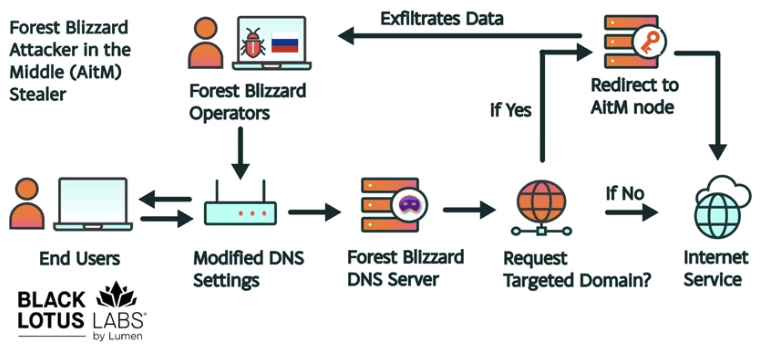
How targeted DNS requests were redirected at the router. Image: Black Lotus Labs.
Also known as APT28 and Fancy Bear, Forest Blizzard is attributed to the military intelligence units within Russia’s General Staff Main Intelligence Directorate (GRU). APT 28 famously compromised the Hillary Clinton campaign, the Democratic National Committee, and the Democratic Congressional Campaign Committee in 2016 in an attempt to interfere with the U.S. presidential election.
Researchers at Black Lotus Labs, a security division of the Internet backbone provider Lumen, found that at the peak of its activity in December 2025, Forest Blizzard’s surveillance dragnet ensnared more than 18,000 Internet routers that were mostly unsupported, end-of-life routers, or else far behind on security updates. A new report from Lumen says the hackers primarily targeted government agencies—including ministries of foreign affairs, law enforcement, and third-party email providers.
Black Lotus Security Engineer Ryan English said the GRU hackers did not need to install malware on the targeted routers, which were mainly older Mikrotik and TP-Link devices marketed to the Small Office/Home Office (SOHO) market. Instead, they used known vulnerabilities to modify the Domain Name System (DNS) settings of the routers to include DNS servers controlled by the hackers.
As the U.K.’s National Cyber Security Centre (NCSC) notes in a new advisory detailing how Russian cyber actors have been compromising routers, DNS is what allows individuals to reach websites by typing familiar addresses, instead of associated IP addresses. In a DNS hijacking attack, bad actors interfere with this process to covertly send users to malicious websites designed to steal login details or other sensitive information.
English said the routers attacked by Forest Blizzard were reconfigured to use DNS servers that pointed to a handful of virtual private servers controlled by the attackers. Importantly, the attackers could then propagate their malicious DNS settings to all users on the local network, and from that point forward intercept any OAuth authentication tokens transmitted by those users.
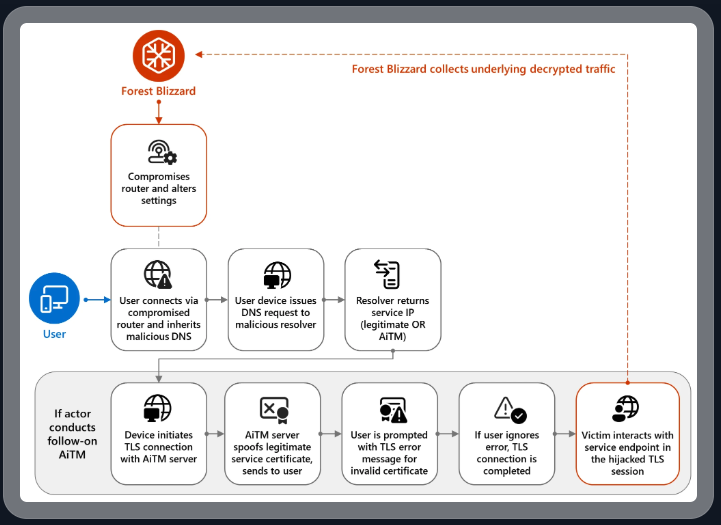
DNS hijacking through router compromise. Image: Microsoft.
Because those tokens are typically transmitted only after the user has successfully logged in and gone through multi-factor authentication, the attackers could gain direct access to victim accounts without ever having to phish each user’s credentials and/or one-time codes.
“Everyone is looking for some sophisticated malware to drop something on your mobile devices or something,” English said. “These guys didn’t use malware. They did this in an old-school, graybeard way that isn’t really sexy but it gets the job done.”
Microsoft refers to the Forest Blizzard activity as using DNS hijacking “to support post-compromise adversary-in-the-middle (AiTM) attacks on Transport Layer Security (TLS) connections against Microsoft Outlook on the web domains.” The software giant said while targeting SOHO devices isn’t a new tactic, this is the first time Microsoft has seen Forest Blizzard using “DNS hijacking at scale to support AiTM of TLS connections after exploiting edge devices.”
Black Lotus Labs engineer Danny Adamitis said it will be interesting to see how Forest Blizzard reacts to today’s flurry of attention to their espionage operation, noting that the group immediately switched up its tactics in response to a similar NCSC report (PDF) in August 2025. At the time, Forest Blizzard was using malware to control a far more targeted and smaller group of compromised routers. But Adamitis said the day after the NCSC report, the group quickly ditched the malware approach in favor of mass-altering the DNS settings on thousands of vulnerable routers.
“Before the last NCSC report came out they used this capability in very limited instances,” Adamitis told KrebsOnSecurity. “After the report was released they implemented the capability in a more systemic fashion and used it to target everything that was vulnerable.”
TP-Link was among the router makers facing a complete ban in the United States. But on March 23, the U.S. Federal Communications Commission (FCC) took a much broader approach, announcing it would no longer certify consumer-grade Internet routers that are produced outside of the United States.
The FCC warned that foreign-made routers had become an untenable national security threat, and that poorly-secured routers present “a severe cybersecurity risk that could be leveraged to immediately and severely disrupt U.S. critical infrastructure and directly harm U.S. persons.”
Experts have countered that few new consumer-grade routers would be available for purchase under this new FCC policy (besides maybe Musk’s Starlink satellite Internet routers, which are produced in Texas). The FCC says router makers can apply for a special “conditional approval” from the Department of War or Department of Homeland Security, and that the new policy does not affect any previously-purchased consumer-grade routers.
Hong Kong Police Can Force You to Reveal Your Encryption Keys
According to a new law, the Hong Kong police can demand that you reveal the encryption keys protecting your computer, phone, hard drives, etc.—even if you are just transiting the airport.
In a security alert dated March 26, the U.S. Consulate General said that, on March 23, 2026, Hong Kong authorities changed the rules governing enforcement of the National Security Law. Under the revised framework, police can require individuals to provide passwords or other assistance to access personal electronic devices, including cellphones and laptops.
...
New Mexico’s Meta Ruling and Encryption
Mike Masnick points out that the recent New Mexico court ruling against Meta has some bad implications for end-to-end encryption, and security in general:
If the “design choices create liability” framework seems worrying in the abstract, the New Mexico case provides a concrete example of where it leads in practice.
One of the key pieces of evidence the New Mexico attorney general used against Meta was the company’s 2023 decision to add end-to-end encryption to Facebook Messenger. The argument went like this: predators used Messenger to groom minors and exchange child sexual abuse material. By encrypting those messages, Meta made it harder for law enforcement to access evidence of those crimes. Therefore, the encryption was a design choice that enabled harm...
Google Wants to Transition to Post-Quantum Cryptography by 2029
Google says that it will fully transition to post-quantum cryptography by 2029. I think this is a good move, not because I think we will have a useful quantum computer anywhere near that year, but because crypto-agility is always a good thing.
Slashdot thread.
Germany Doxes “UNKN,” Head of RU Ransomware Gangs REvil, GandCrab
An elusive hacker who went by the handle “UNKN” and ran the early Russian ransomware groups GandCrab and REvil now has a name and a face. Authorities in Germany say 31-year-old Russian Daniil Maksimovich Shchukin headed both cybercrime gangs and helped carry out at least 130 acts of computer sabotage and extortion against victims across the country between 2019 and 2021.
Shchukin was named as UNKN (a.k.a. UNKNOWN) in an advisory published by the German Federal Criminal Police (the “Bundeskriminalamt” or BKA for short). The BKA said Shchukin and another Russian — 43-year-old Anatoly Sergeevitsch Kravchuk — extorted nearly $2 million euros across two dozen cyberattacks that caused more than 35 million euros in total economic damage.

Daniil Maksimovich SHCHUKIN, a.k.a. UNKN, and Anatoly Sergeevitsch Karvchuk, alleged leaders of the GandCrab and REvil ransomware groups.
Germany’s BKA said Shchukin acted as the head of one of the largest worldwide operating ransomware groups GandCrab and REvil, which pioneered the practice of double extortion — charging victims once for a key needed to unlock hacked systems, and a separate payment in exchange for a promise not to publish stolen data.
Shchukin’s name appeared in a Feb. 2023 filing (PDF) from the U.S. Justice Department seeking the seizure of various cryptocurrency accounts associated with proceeds from the REvil ransomware gang’s activities. The government said the digital wallet tied to Shchukin contained more than $317,000 in ill-gotten cryptocurrency.
The GandCrab ransomware affiliate program first surfaced in January 2018, and paid enterprising hackers huge shares of the profits just for hacking into user accounts at major corporations. The GandCrab team would then try to expand that access, often siphoning vast amounts of sensitive and internal documents in the process. The malware’s curators shipped five major revisions to the GandCrab code, each corresponding with sneaky new features and bug fixes aimed at thwarting the efforts of computer security firms to stymie the spread of the malware.
On May 31, 2019, the GandCrab team announced the group was shutting down after extorting more than $2 billion from victims. “We are a living proof that you can do evil and get off scot-free,” GandCrab’s farewell address famously quipped. “We have proved that one can make a lifetime of money in one year. We have proved that you can become number one by general admission, not in your own conceit.”
The REvil ransomware affiliate program materialized around the same as GandCrab’s demise, fronted by a user named UNKNOWN who announced on a Russian cybercrime forum that he’d deposited $1 million in the forum’s escrow to show he meant business. By this time, many cybersecurity experts had concluded REvil was little more than a reorganization of GandCrab.
UNKNOWN also gave an interview to Dmitry Smilyanets, a former malicious hacker hired by Recorded Future, wherein UNKNOWN described a rags-to-riches tale unencumbered by ethics and morals.
“As a child, I scrounged through the trash heaps and smoked cigarette butts,” UNKNOWN told Recorded Future. “I walked 10 km one way to the school. I wore the same clothes for six months. In my youth, in a communal apartment, I didn’t eat for two or even three days. Now I am a millionaire.”
As described in The Ransomware Hunting Team by Renee Dudley and Daniel Golden, UNKNOWN and REvil reinvested significant earnings into improving their success and mirroring practices of legitimate businesses. The authors wrote:
“Just as a real-world manufacturer might hire other companies to handle logistics or web design, ransomware developers increasingly outsourced tasks beyond their purview, focusing instead on improving the quality of their ransomware. The higher quality ransomware—which, in many cases, the Hunting Team could not break—resulted in more and higher pay-outs from victims. The monumental payments enabled gangs to reinvest in their enterprises. They hired more specialists, and their success accelerated.”
“Criminals raced to join the booming ransomware economy. Underworld ancillary service providers sprouted or pivoted from other criminal work to meet developers’ demand for customized support. Partnering with gangs like GandCrab, ‘cryptor’ providers ensured ransomware could not be detected by standard anti-malware scanners. ‘Initial access brokerages’ specialized in stealing credentials and finding vulnerabilities in target networks, selling that access to ransomware operators and affiliates. Bitcoin “tumblers” offered discounts to gangs that used them as a preferred vendor for laundering ransom payments. Some contractors were open to working with any gang, while others entered exclusive partnerships.”
REvil would evolve into a feared “big-game-hunting” machine capable of extracting hefty extortion payments from victims, largely going after organizations with more than $100 million in annual revenues and fat new cyber insurance policies that were known to pay out.
Over the July 4, 2021 weekend in the United States, REvil hacked into and extorted Kaseya, a company that handled IT operations for more than 1,500 businesses, nonprofits and government agencies. The FBI would later announce they’d infiltrated the ransomware group’s servers prior to the Kaseya hack but couldn’t tip their hand at the time. REvil never recovered from that core compromise, or from the FBI’s release of a free decryption key for REvil victims who couldn’t or didn’t pay.
Shchukin is from Krasnodar, Russia and is thought to reside there, the BKA said.
“Based on the investigations so far, it is assumed that the wanted person is abroad, presumably in Russia,” the BKA advised. “Travel behaviour cannot be ruled out.”
There is little that connects Shchukin to UNKNOWN’s various accounts on the Russian crime forums. But a review of the Russian crime forums indexed by the cyber intelligence firm Intel 471 shows there is plenty connecting Shchukin to a hacker identity called “Ger0in” who operated large botnets and sold “installs” — allowing other cybercriminals to rapidly deploy malware of their choice to thousands of PCs in one go. However, Ger0in was only active between 2010 and 2011, well before UNKNOWN’s appearance as the REvil front man.
A review of the mugshots released by the BKA at the image comparison site Pimeyes found a match on this birthday celebration from 2023, which features a young man named Daniel wearing the same fancy watch as in the BKA photos.

Images from Daniil Shchukin’s birthday party celebration in Krasnodar in 2023.
Update, April 6, 12:06 p.m. ET: A reader forwarded this English-dubbed audio recording from the a ccc.de (37C3) conference talk in Germany from 2023 that previously outed Shchukin as the REvil leader (Shchuckin is mentioned at around 24:25).
Friday Squid Blogging: Jurassic Fish Chokes on Squid
Here’s a fossil of a 150-million year old fish that choked to death on a belemnite rostrum: the hard, internal shell of an extinct, squid-like animal.
Original paper.
As usual, you can also use this squid post to talk about the security stories in the news that I haven’t covered.
Company that Secretly Records and Publishes Zoom Meetings
WebinarTV searches the internet for public Zoom invites, joins the meetings, secretly records them, and publishes (alternate link) the recordings. It doesn’t use the Zoom record feature, so Zoom can’t do anything about it.
US Bans All Foreign-Made Consumer Routers
This is for new routers; you don’t have to throw away your existing ones:
The Executive Branch determination noted that foreign-produced routers (1) introduce “a supply chain vulnerability that could disrupt the U.S. economy, critical infrastructure, and national defense” and (2) pose “a severe cybersecurity risk that could be leveraged to immediately and severely disrupt U.S. critical infrastructure and directly harm U.S. persons.”
More information:
Any new router made outside the US will now need to be approved by the FCC before it can be imported, marketed, or sold in the country...
Possible US Government iPhone Hacking Tool Leaked
Wired writes (alternate source):
Security researchers at Google on Tuesday released a report describing what they’re calling “Coruna,” a highly sophisticated iPhone hacking toolkit that includes five complete hacking techniques capable of bypassing all the defenses of an iPhone to silently install malware on a device when it visits a website containing the exploitation code. In total, Coruna takes advantage of 23 distinct vulnerabilities in iOS, a rare collection of hacking components that suggests it was created by a well-resourced, likely state-sponsored group of hackers...
Is “Hackback” Official US Cybersecurity Strategy?
The 2026 US “Cyber Strategy for America” document is mostly the same thing we’ve seen out of the White House for over a decade, but with a more aggressive tone.
But one sentence stood out: “We will unleash the private sector by creating incentives to identify and disrupt adversary networks and scale our national capabilities.” This sounds like a call for hackback: giving private companies permission to conduct offensive cyber operations.
The Economist noticed (alternate link) this, too.
I think this is an incredibly dumb idea:
In warfare, the notion of counterattack is extremely powerful. Going after the enemy—its positions, its supply lines, its factories, its infrastructure—is an age-old military tactic. But in peacetime, we call it revenge, and consider it dangerous. Anyone accused of a crime deserves a fair trial. The accused has the right to defend himself, to face his accuser, to an attorney, and to be presumed innocent until proven guilty...
Kubernetes v1.36 Sneak Peek
Kubernetes v1.36 is coming at the end of April 2026. This release will include removals and deprecations, and it is packed with an impressive number of enhancements. Here are some of the features we are most excited about in this cycle!
Please note that this information reflects the current state of v1.36 development and may change before release.
The Kubernetes API removal and deprecation process
The Kubernetes project has a well-documented deprecation policy for features. This policy states that stable APIs may only be deprecated when a newer, stable version of that same API is available and that APIs have a minimum lifetime for each stability level. A deprecated API has been marked for removal in a future Kubernetes release. It will continue to function until removal (at least one year from the deprecation), but usage will result in a warning being displayed. Removed APIs are no longer available in the current version, at which point you must migrate to using the replacement.
- Generally available (GA) or stable API versions may be marked as deprecated but must not be removed within a major version of Kubernetes.
- Beta or pre-release API versions must be supported for 3 releases after the deprecation.
- Alpha or experimental API versions may be removed in any release without prior deprecation notice; this process can become a withdrawal in cases where a different implementation for the same feature is already in place.
Whether an API is removed as a result of a feature graduating from beta to stable, or because that API simply did not succeed, all removals comply with this deprecation policy. Whenever an API is removed, migration options are communicated in the deprecation guide.
A recent example of this principle in action is the retirement of the ingress-nginx project, announced by SIG-Security on March 24, 2026. As stewardship shifts away from the project, the community has been encouraged to evaluate alternative ingress controllers that align with current security and maintenance best practices. This transition reflects the same lifecycle discipline that underpins Kubernetes itself, ensuring continued evolution without abrupt disruption.
Ingress NGINX retirement
To prioritize the safety and security of the ecosystem, Kubernetes SIG Network and the Security Response Committee have retired Ingress NGINX on March 24, 2026. Since that date, there have been no further releases, no bugfixes, and no updates to resolve any security vulnerabilities discovered. Existing deployments of Ingress NGINX will continue to function, and installation artifacts like Helm charts and container images will remain available.
For full details, see the official retirement announcement.
Deprecations and removals for Kubernetes v1.36
Deprecation of .spec.externalIPs in Service
The externalIPs field in Service spec is being deprecated, which means you’ll soon lose a quick way to route arbitrary externalIPs to your Services. This
field has been a known security headache for years, enabling man-in-the-middle attacks on your cluster traffic, as documented in CVE-2020-8554. From Kubernetes v1.36 and onwards, you will see deprecation warnings when using it, with full removal
planned for v1.43.
If your Services still lean on externalIPs, consider using LoadBalancer services for cloud-managed ingress, NodePort for simple port exposure, or Gateway API
for a more flexible and secure way to handle external traffic.
For more details on this enhancement, refer to KEP-5707: Deprecate service.spec.externalIPs
Removal of gitRepo volume driver
The gitRepo volume type has been deprecated since v1.11. Starting Kubernetes v1.36, the gitRepo volume plugin is permanently disabled and cannot be turned back
on. This change protects clusters from a critical security issue where using gitRepo could let an attacker run code as root on the node.
Although gitRepo has been deprecated for years and better alternatives have been recommended, it was still technically possible to use it in previous releases.
From v1.36 onward, that path is closed for good, so any existing workloads depending on gitRepo will need to migrate to supported approaches such as init
containers or external git-sync style tools.
For more details on this enhancement, refer to KEP-5040: Remove gitRepo volume driver
Featured enhancements of Kubernetes v1.36
The following list of enhancements is likely to be included in the upcoming v1.36 release. This is not a commitment and the release content is subject to change.
Faster SELinux labelling for volumes (GA)
Kubernetes v1.36 makes the SELinux volume mounting improvement generally available. This change replaced recursive file relabeling with mount -o context=XYZ option, applying the correct SELinux label to the entire volume at mount time. It brings more consistent performance and reduces Pod startup delays on SELinux-enforcing systems.
This feature was introduced as beta in v1.28 for ReadWriteOncePod volumes. In v1.32, it gained metrics and an opt-out option
(securityContext.seLinuxChangePolicy: Recursive) to help catch conflicts. Now in v1.36, it reaches stable and defaults to all volumes, with Pods or
CSIDrivers opting in via spec.SELinuxMount.
However, we expect this feature to create the risk of breaking changes in the future Kubernetes releases, due to the potential for mixing of privileged and unprivileged pods.
Setting the seLinuxChangePolicy field and
SELinux volume labels on Pods, correctly, is the responsibility of the Pod author
Developers have that responsibility whether they are writing a Deployment, StatefulSet, DaemonSet or even a custom resource that includes a Pod template.
Being careless
with these settings can lead to a range of problems when Pods share volumes.
For more details on this enhancement, refer to KEP-1710: Speed up recursive SELinux label change
External signing of ServiceAccount tokens
As a beta feature, Kubernetes already supports external signing of ServiceAccount tokens. This allows clusters to integrate with external key management systems or signing services instead of relying only on internally managed keys.
With this enhancement, the kube-apiserver can delegate token signing to external systems such as cloud key management services or hardware security modules. This
improves security and simplifies key management services for clusters that rely on centralized signing infrastructure.
We expect that this will graduate to stable (GA) in Kubernetes v1.36.
For more details on this enhancement, refer to KEP-740: Support external signing of service account tokens
DRA Driver support for Device taints and tolerations
Kubernetes v1.33 introduced support for taints and tolerations for physical devices managed through Dynamic Resource Allocation (DRA). Normally, any device can be
used for scheduling. However, this enhancement allows DRA drivers to mark devices as tainted, which ensures that they will not be used for scheduling purposes.
Alternatively, cluster administrators can create a DeviceTaintRule to mark devices that match a certain selection criteria(such as all devices of a certain
driver) as tainted. This improves scheduling control and helps ensure that specialized hardware resources are only used by workloads that explicitly request them.
In Kubernetes v1.36, this feature graduates to beta with more comprehensive testing complete, making it accessible by default without the need for a feature flag and open to user feedback.
To learn about taints and tolerations, see taints and tolerations.
For more details on this enhancement, refer to KEP-5055: DRA: device taints and tolerations.
DRA support for partitionable devices
Kubernetes v1.36 expands Dynamic Resource Allocation (DRA) by introducing support for partitionable devices, allowing a single hardware accelerator to be split into multiple logical units that can be shared across workloads. This is especially useful for high-cost resources like GPUs, where dedicating an entire device to a single workload can lead to underutilization.
With this enhancement, platform teams can improve overall cluster efficiency by allocating only the required portion of a device to each workload, rather than reserving it entirely. This makes it easier to run multiple workloads on the same hardware while maintaining isolation and control, helping organizations get more value out of their infrastructure.
To learn more about this enhancement, refer to KEP-4815: DRA Partitionable Devices
Want to know more?
New features and deprecations are also announced in the Kubernetes release notes. We will formally announce what's new in Kubernetes v1.36 as part of the CHANGELOG for that release.
Kubernetes v1.36 release is planned for Wednesday, April 22, 2026. Stay tuned for updates!
You can also see the announcements of changes in the release notes for:
- Kubernetes v1.35
- Kubernetes v1.34
- Kubernetes v1.33
- Kubernetes v1.32
- Kubernetes v1.31
- Kubernetes v1.30
Get involved
The simplest way to get involved with Kubernetes is by joining one of the many Special Interest Groups (SIGs) that align with your interests. Have something you’d like to broadcast to the Kubernetes community? Share your voice at our weekly community meeting, and through the channels below. Thank you for your continued feedback and support.
- Follow us on Bluesky @kubernetes.io for the latest updates
- Join the community discussion on Discuss
- Join the community on Slack
- Post questions (or answer questions) on Server Fault or Stack Overflow
- Share your Kubernetes story
- Read more about what’s happening with Kubernetes on the blog
- Learn more about the Kubernetes Release Team
Announcing Red Hat Advanced Cluster Security for Kubernetes 4.10
The weight of AI models: Why infrastructure always arrives slowly
As AI adoption accelerates across industries, organizations face a critical bottleneck that is often overlooked until it becomes a serious obstacle: reliably managing and distributing large model weight files at scale. A model’s weights serve as the central artifact that bridges both training and inference pipelines — yet the infrastructure surrounding this artifact is frequently an afterthought.
This article addresses the operational challenges of managing AI model artifacts at enterprise scale, and introduces a cloud-native solution that brings software delivery best practices – versioning, immutability, and GitOps, to the world of large model files.
The gap nobody talks about — until it breaks production
The cloud native gap: Most existing ML model storage approaches were not designed with Kubernetes-native delivery in mind, leaving a critical gap between how software artifacts are managed and how model artifacts are managed. Within the CNCF ecosystem, projects such as ModelPack, ORAS, Harbor, and Dragonfly are exploring complementary approaches to managing and distributing large artifacts.
Today, enterprises operate AI infrastructure on Kubernetes yet their model artifact management lags behind. Software containers are pulled from OCI registries with full versioning, security scanning, and rollback support. Model weights, by contrast, are often downloaded via ad hoc scripts, copied manually between storage buckets, or distributed through unsecured shared filesystems. This gap creates deployment fragility, security risks, and operational overhead at scale.
When your model weighs more than your entire app
Modern foundation models are not small. A single model checkpoint can range from tens of gigabytes to several terabytes. For reference, a quantized LLaMA-3 70B model weighs approximately 140 GB, while frontier multimodal models can easily exceed 1 TB. These are not files you version-control with standard Git — they demand dedicated storage strategies, efficient transfer protocols, and careful access control.
The core challenges are: storage at scale, distribution speed, and reproducibility. Teams need to store multiple model versions, rapidly distribute them to GPU inference nodes across regions, and guarantee that any deployment can be traced back to an exact, immutable artifact.
Three paths forward — and why none of them are enough
Git LFS (Hugging Face Hub)Object Storage (S3, MinIO)Distributed Filesystem (NFS, CephFS)ProsNative version control (branches, tags, commits, history).Standard offering from cloud providers. Native support in engines like vLLM/SGLang.POSIX compatible. Low integration cost.ConsPoor protocol adaptation for cloud-native environments. Inherits Git’s transport inefficiencies, lacks optimizations for huge file distribution.Lacks structured metadata. Weak version management capabilities.Lacks structured metadata. Weak version management capabilities. High operational complexity for distributed filesystems. Rethinking the delivery pipeline: Models deserve better than a shell scriptThe approach described here treats AI model weights as first-class OCI (Open Container Initiative) artifacts, packaging them in the same container registries used for application images. This enables model delivery to leverage the full ecosystem of container tooling: security scanning, signed provenance, GitOps-driven deployment, and Kubernetes-native pulling.
What If we shipped models the same way we ship code?
In the cloud-native era, developers have long established a mature and efficient paradigm for software delivery.
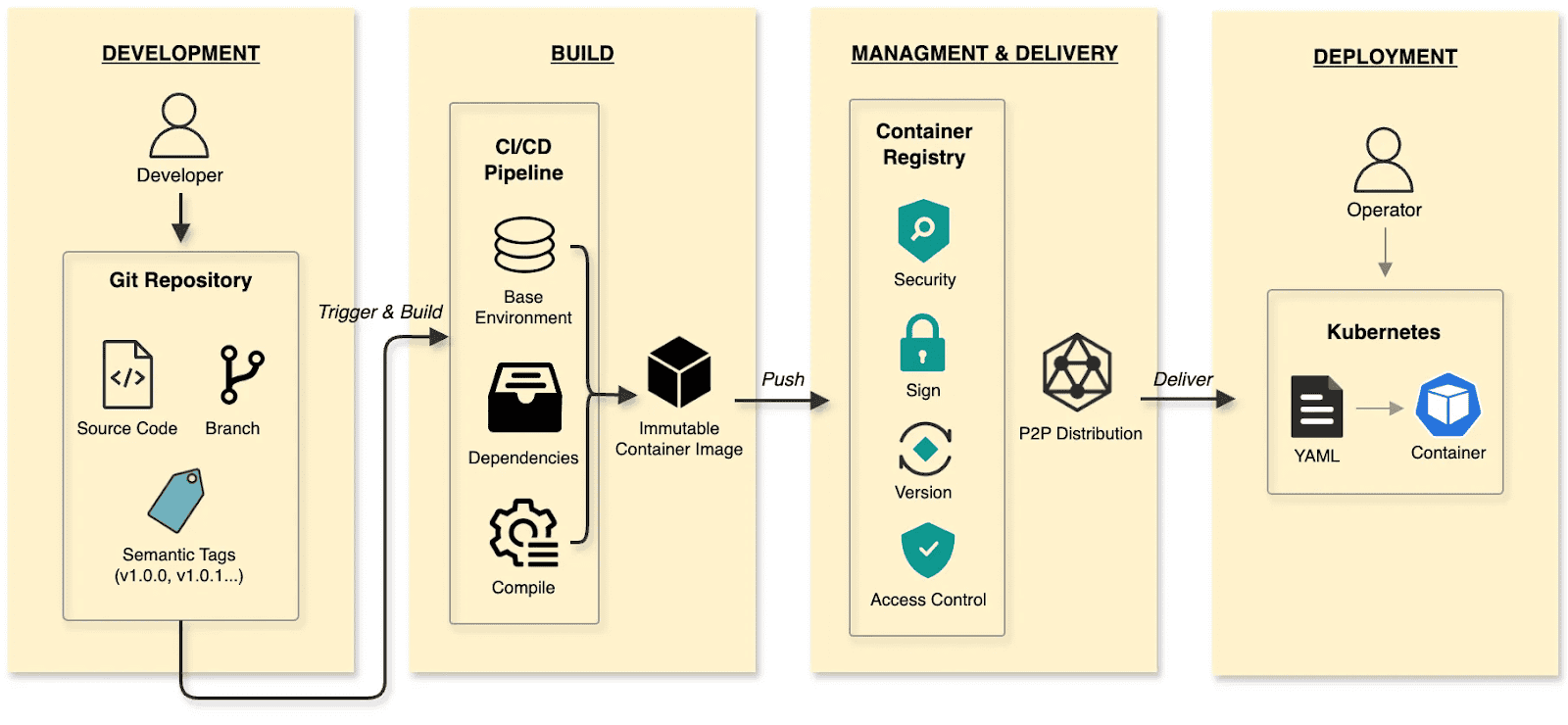
The software delivery:
- Develop: Developers commit code to a Git repository, manage code changes through branches, and define versions using tags at key milestones.
- Build: CI/CD pipelines compile and test, packaging the output into an immutable Container Image.
- Manage and deliver: Images are stored in a Container Registry. Supply chain security (scanning/signing), RBAC, and P2P distribution ensure safe delivery.
- Deploy: DevOps engineers use declarative Kubernetes YAML to define the desired state. The Container’s lifecycle is managed by Kubernetes.
The cloud native AI model delivery:
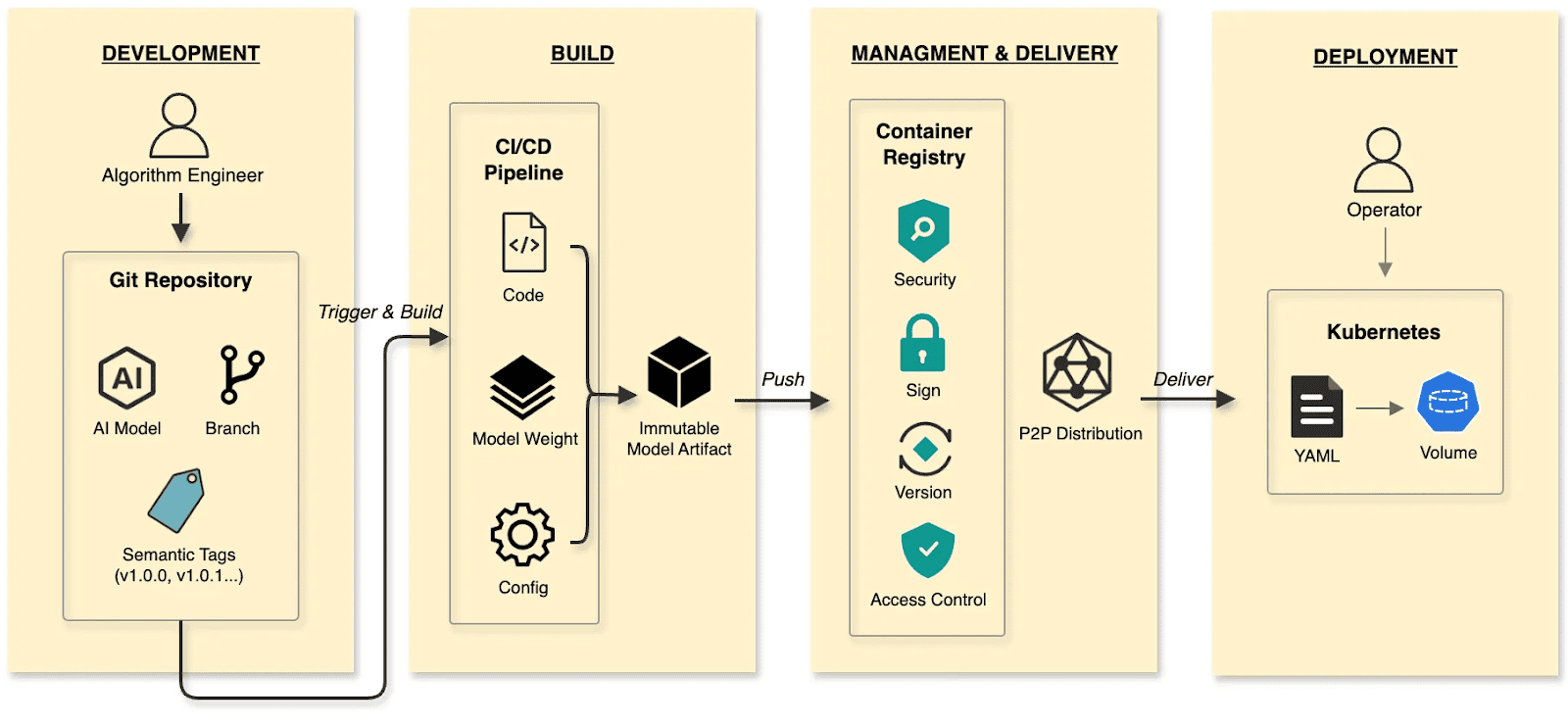
- Develop: Algorithm engineers push weights and configs to the Hugging Face Hub, treating it as the Git Repository.
- Build: CI/CD pipelines package weights, runtime configurations, and metadata into an immutable Model Artifact.
- Manage and deliver: The Model Artifact is managed by an Artifact Registry, reusing the existing container infrastructure and toolchain.
- Deploy: Engineers use Kubernetes OCI Volumes or a Model CSI Driver. Models are mounted into the inference Container as Volumes via declarative semantics, decoupling the AI model from the inference engine (vLLM, SGLang, etc.).
By applying software delivery paradigms and supply chain thinking to model lifecycle management, we constructed a granular, efficient system that resolves the challenges of managing and distributing AI models in production.
Walking the pipeline: A build story in four steps
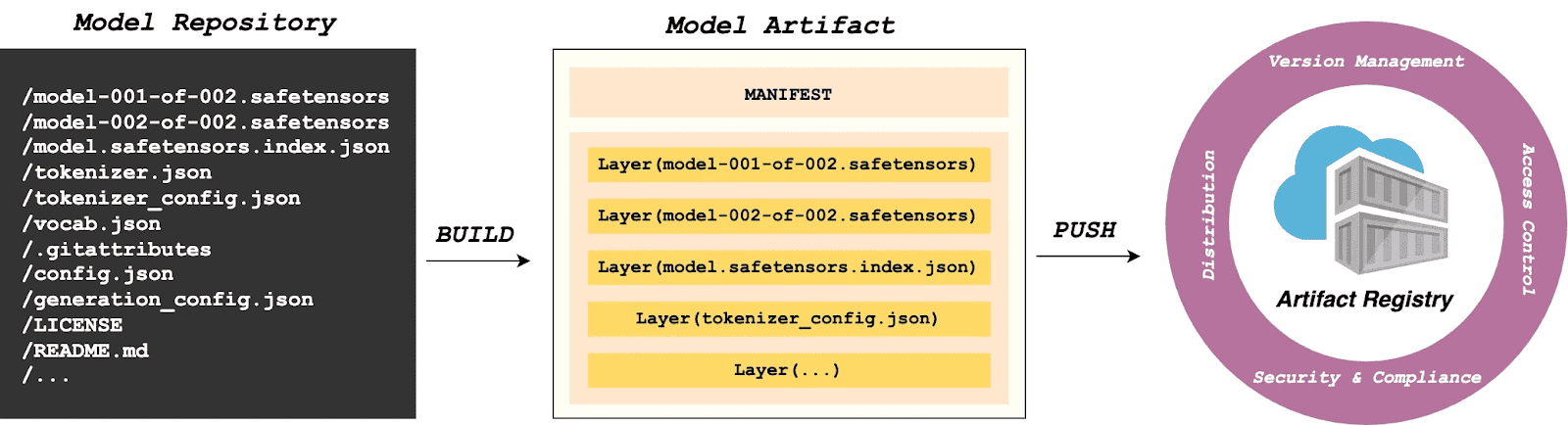
Build
modctl is a CLI tool designed to package AI models into OCI artifacts. It standardizes versioning, storage, distribution and deployment, ensuring integration with the cloud-native ecosystem.
Step 1: Auto-generate Modelfile
Run the following in the model directory to generate a definition file.
$ modctl modelfile generate .Step 2: Customize Modelfile
You can also customize the content of the Modelfile.
# Model name (string), such as llama3-8b-instruct, gpt2-xl, qwen2-vl-72b-instruct, etc.
NAME qwen2.5-0.5b

# Model architecture (string), such as transformer, cnn, rnn, etc.
ARCH transformer

# Model family (string), such as llama3, gpt2, qwen2, etc.
FAMILY qwen2

# Model format (string), such as onnx, tensorflow, pytorch, etc.
FORMAT safetensors

# Specify model configuration file, support glob path pattern.
CONFIG config.json

# Specify model configuration file, support glob path pattern.
CONFIG generation_config.json

# Model weight, support glob path pattern.
MODEL *.safetensors

# Specify code, support glob path pattern.
CODE *.py
Step 3: Login to Artifact Registry (Harbor)
$ modctl login -u username -p password harbor.registry.comStep 4: Build OCI Artifact
$ modctl build -t harbor.registry.com/models/qwen2.5-0.5b:v1 -f Modelfile .A Model Manifest is generated after the build. Descriptive information such as ARCH, FAMILY, and FORMAT is stored in a file with the media type application/vnd.cncf.model.config.v1+json.
{
    "schemaVersion": 2,
    "mediaType": "application/vnd.oci.image.manifest.v1+json",
    "artifactType": "application/vnd.cncf.model.manifest.v1+json",
    "config": {
        "mediaType": "application/vnd.cncf.model.config.v1+json",
        "digest": "sha256:d5815835051dd97d800a03f641ed8162877920e734d3d705b698912602b8c763",
        "size": 301
    },
    "layers": [
        {
            "mediaType": "application/vnd.cncf.model.weight.v1.raw",
            "digest": "sha256:3f907c1a03bf20f20355fe449e18ff3f9de2e49570ffb536f1a32f20c7179808",
            "size": 4294967296
        },
        {
            "mediaType": "application/vnd.cncf.model.weight.v1.raw",
            "digest": "sha256:6d923539c5c208de77146335584252c0b1b81e35c122dd696fe6e04ed03d7411",
            "size": 5018536960
        },
        {
            "mediaType": "application/vnd.cncf.model.weight.config.v1.raw",
            "digest": "sha256:a5378e569c625f7643952fcab30c74f2a84ece52335c292e630f740ac4694146",
            "size": 106
        },
        {
            "mediaType": "application/vnd.cncf.model.weight.code.v1.raw",
            "digest": "sha256:15da0921e8d8f25871e95b8b1fac958fc9caf453bad6f48c881b3d76785b9f9d",
            "size": 394
        },
        {
            "mediaType": "application/vnd.cncf.model.doc.v1.raw",
            "digest": "sha256:5e236ec37438b02c01c83d134203a646cb354766ac294e533a308dd8caa3a11e",
            "size": 23040
        }
    ]
}
Step 5: Push
$ modctl push harbor.registry.com/models/qwen2.5-0.5b:v1Management
Current AI infrastructure workflows focus heavily on model distribution performance, often ignoring model management standards. Manual copying works for experiments, but in large-scale production, lacking unified versioning, metadata specs, and lifecycle management is poor practice. As the standard cloud-native Artifact Registry, Harbor is ideally suited for model storage, treating models as inference artifacts.
Harbor standardizes AI model management through:
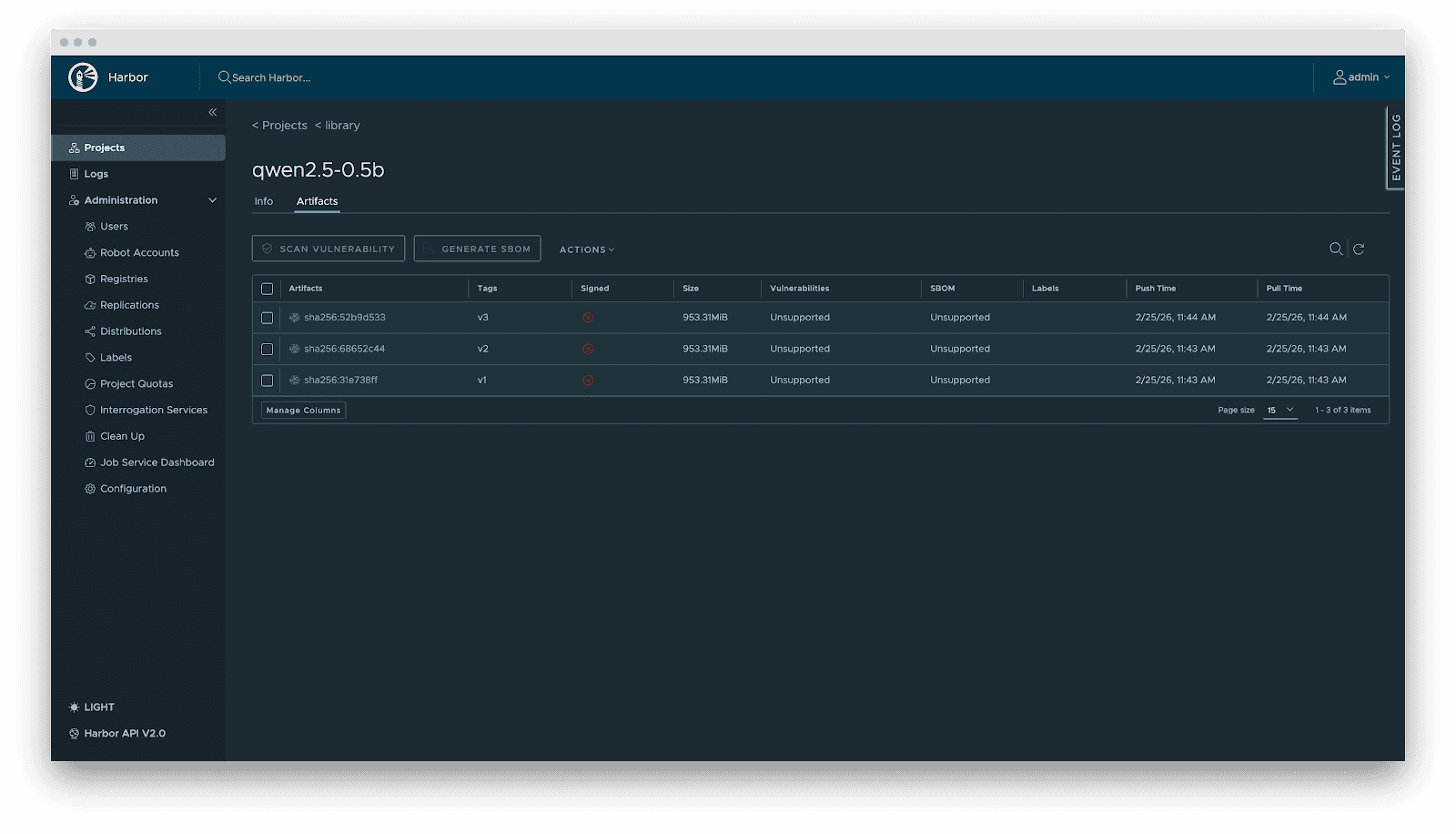
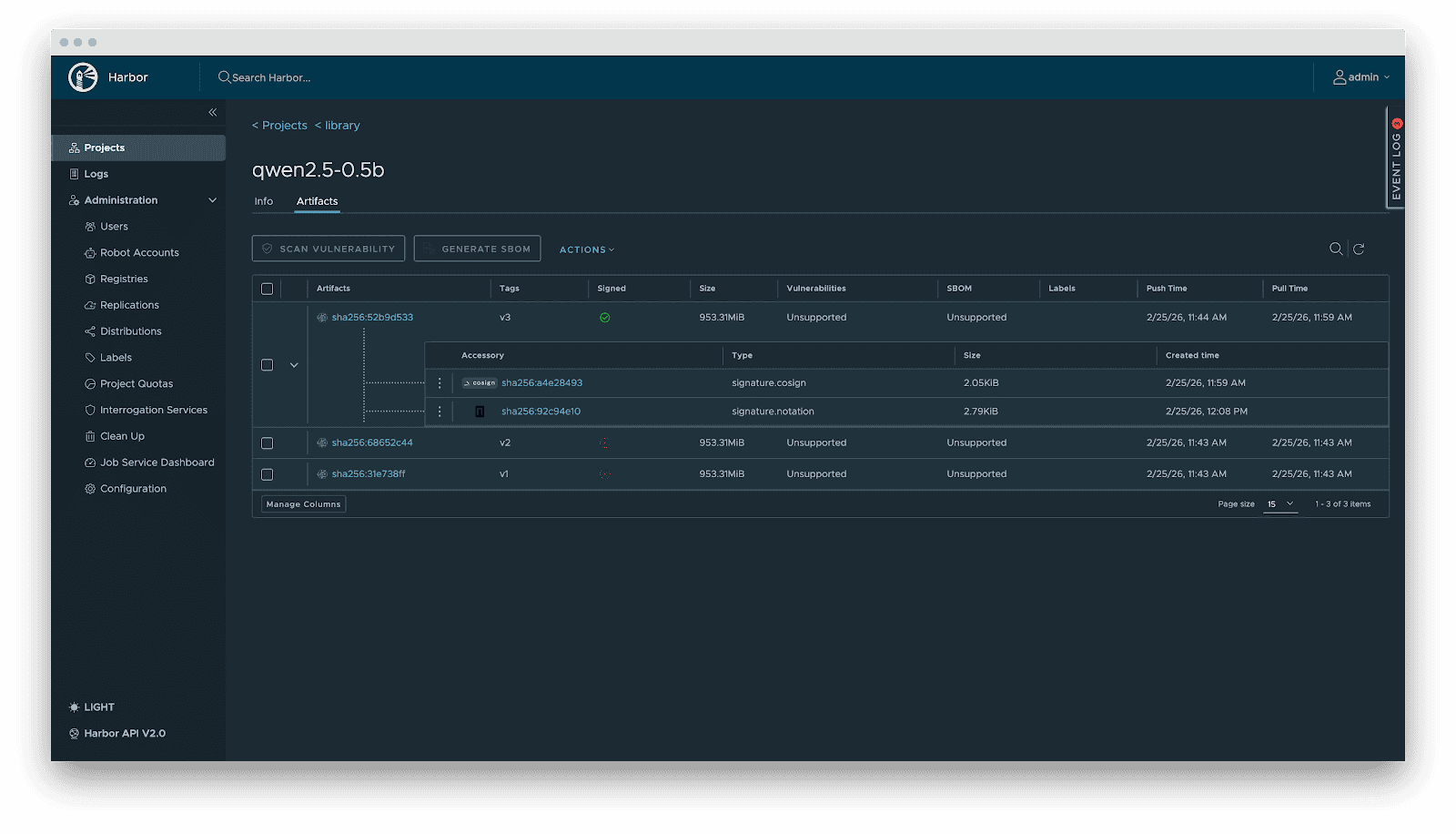
- Versioning: Models are OCI Artifacts with immutable Tags and Sha256 Digests. This guarantees deterministic inference environments. Meanwhile, it visually presents the model’s basic attributes, parameter configurations, display information, and the file list, which not only reduces the risks of unknown versions but also achieves full transparency of the model.
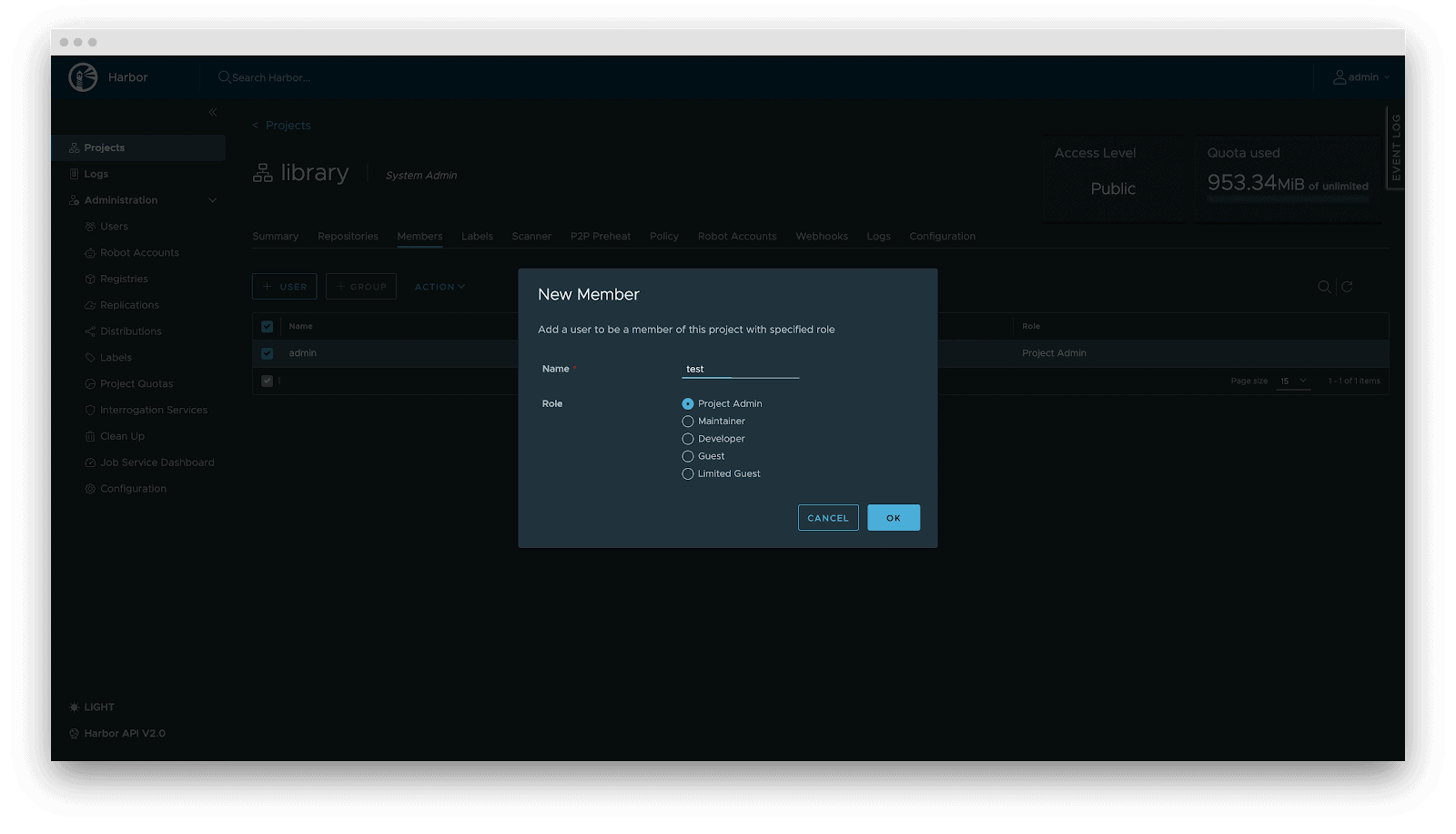
- RBAC: Fine-grained access control. Control who can PUSH (e.g., Algorithm Engineers), who can only PULL (e.g., Inference Services), and who has administrative privileges.
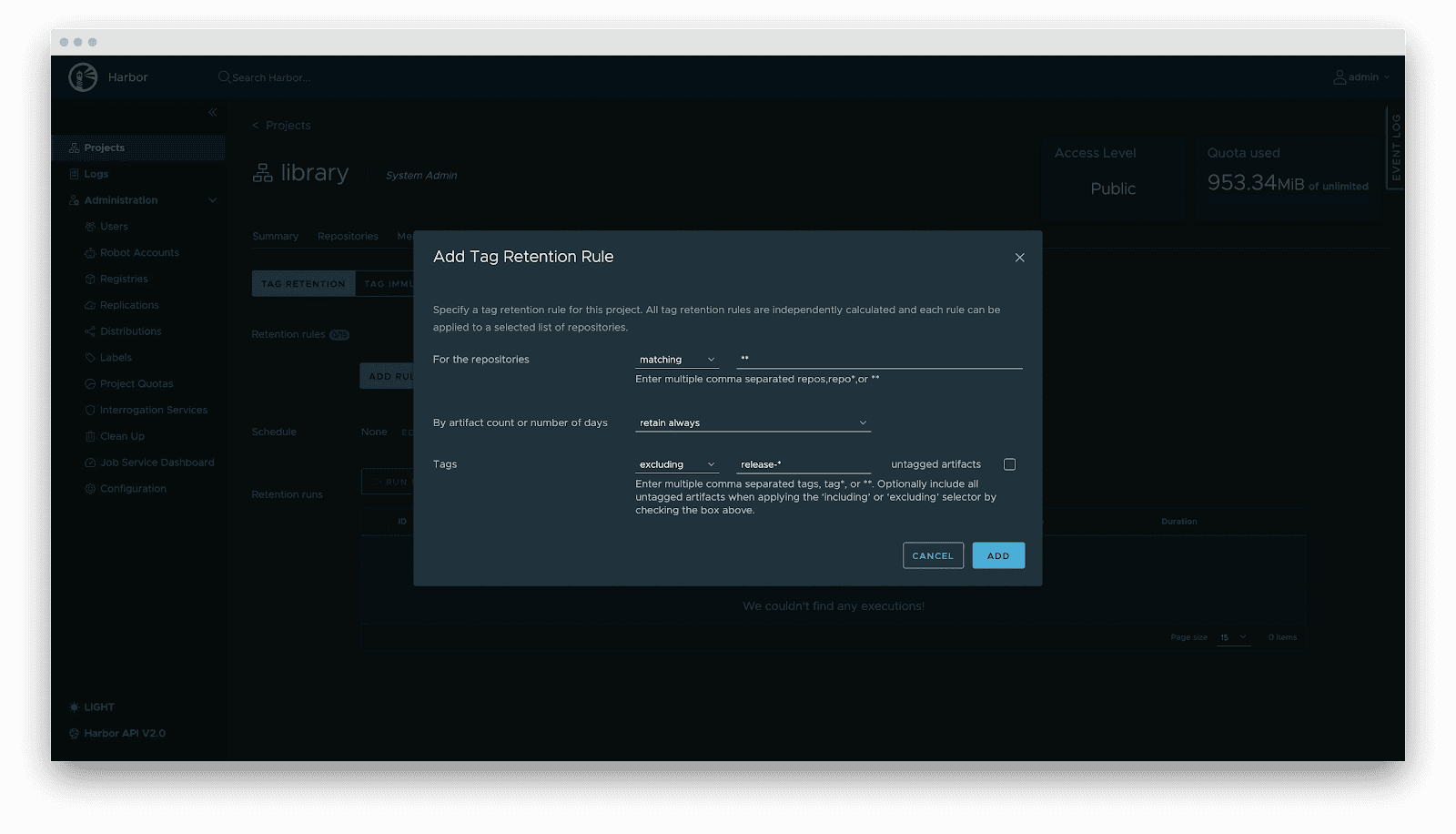
- Lifecycle management: Tag retention policies automatically purge non-release versions while locking active versions, balancing storage costs with stability.
- Supply chain security: Integration with Cosign/Notation for signing. Harbor enforces signature verification before distribution, preventing model poisoning attacks.
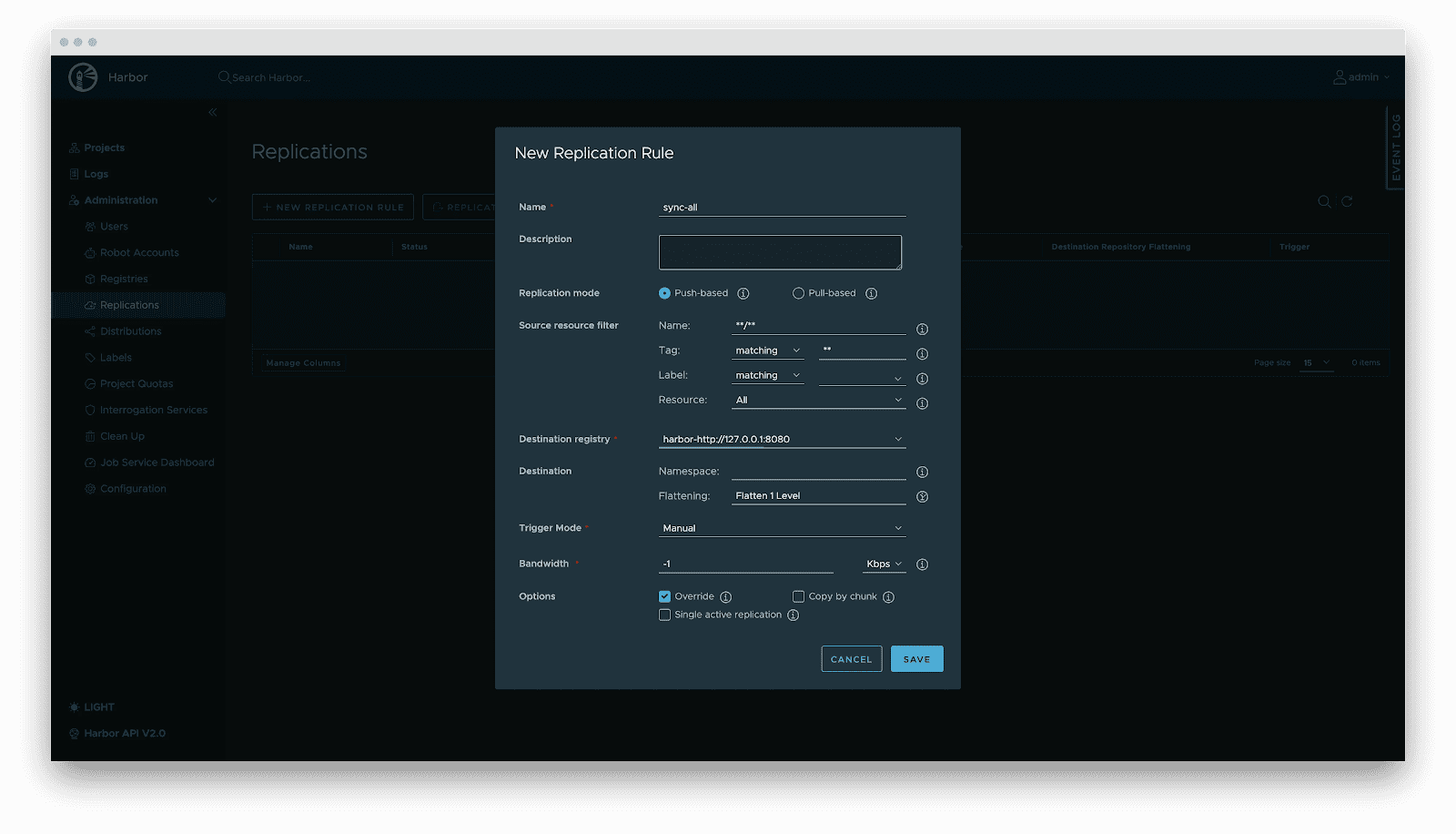
- Replication: Automated, incremental synchronization between central and edge registries or active-standby clusters.
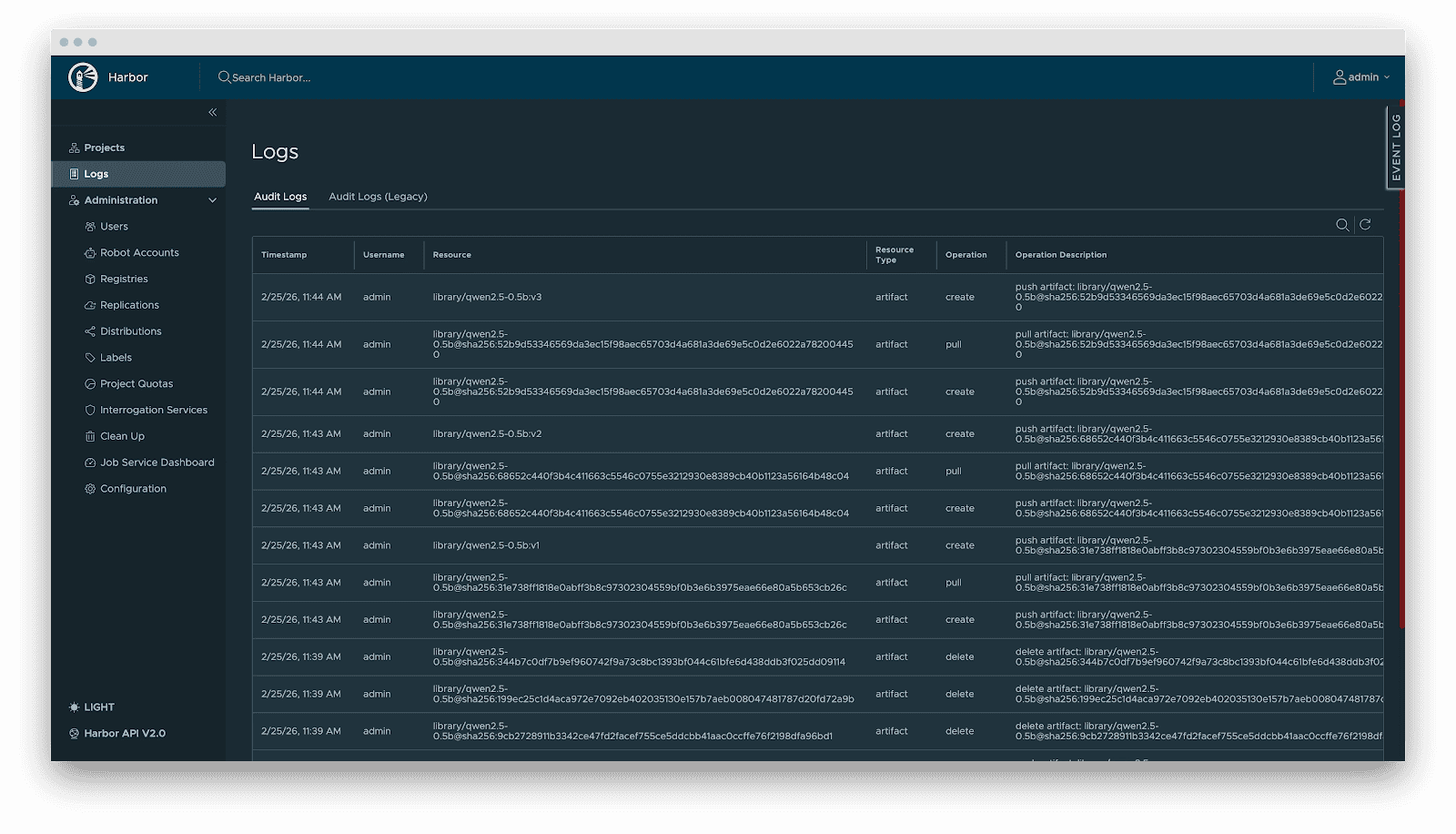
- Audit: Comprehensive logging of all artifact operations (pull/push/delete) for security compliance and traceability.
Delivery
Downloading terabyte-sized model weights directly from the origin introduces bandwidth bottlenecks. We utilize Dragonfly for P2P-based distribution, integrated with Harbor for preheating.
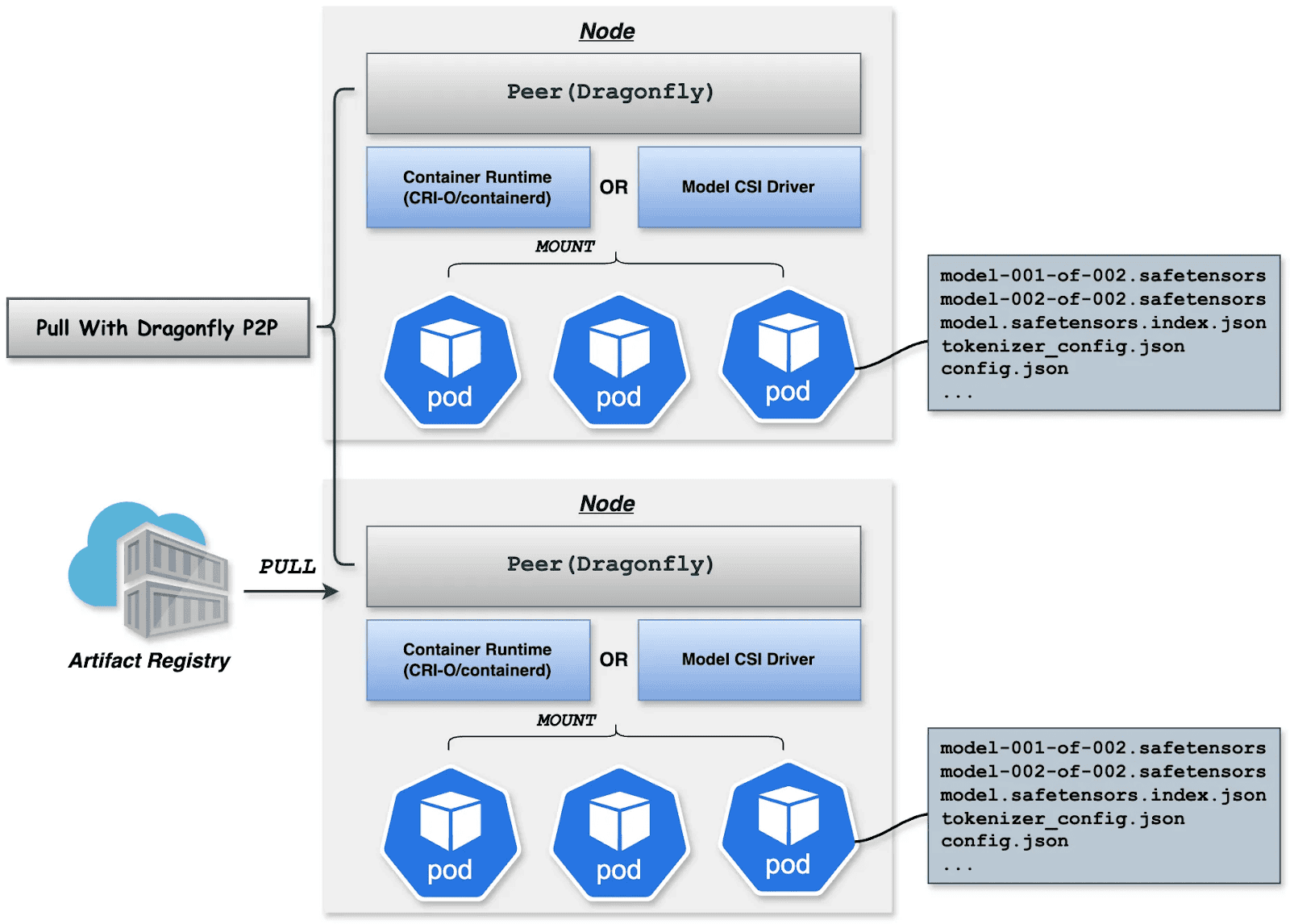
Dragonfly P2P-based distribution
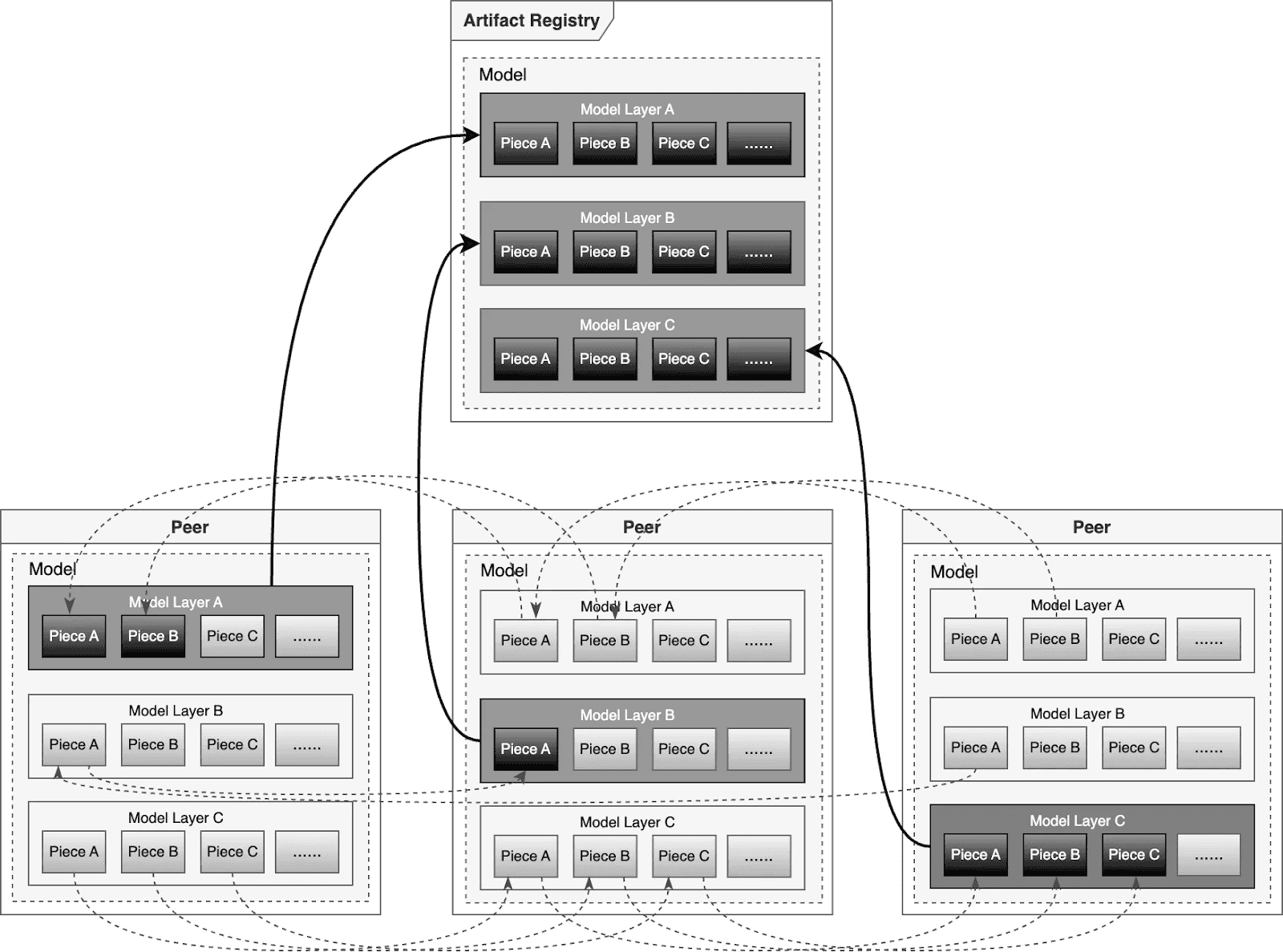
For large-scale distribution scenarios, Dragonfly has been deeply optimized based on P2P technology. Taking the example of 500 nodes downloading a 1TB model, the system distributes the initial download tasks of different layers across nodes to maximize downstream bandwidth utilization and avoid single-point congestion. Combined with a secondary bandwidth-aware scheduling algorithm, it dynamically adjusts download paths to eliminate network hotspots and long-tail latency. For individual model weight, Dragonfly splits individual model weights into pieces and fetches them concurrently from the origin. This enables streaming-based downloading, allowing users to share models without waiting for the complete file. This solution has been proven in high-performance AI clusters, utilizing 70%–80% of each node’s bandwidth and improving model deployment efficiency.
Preheating
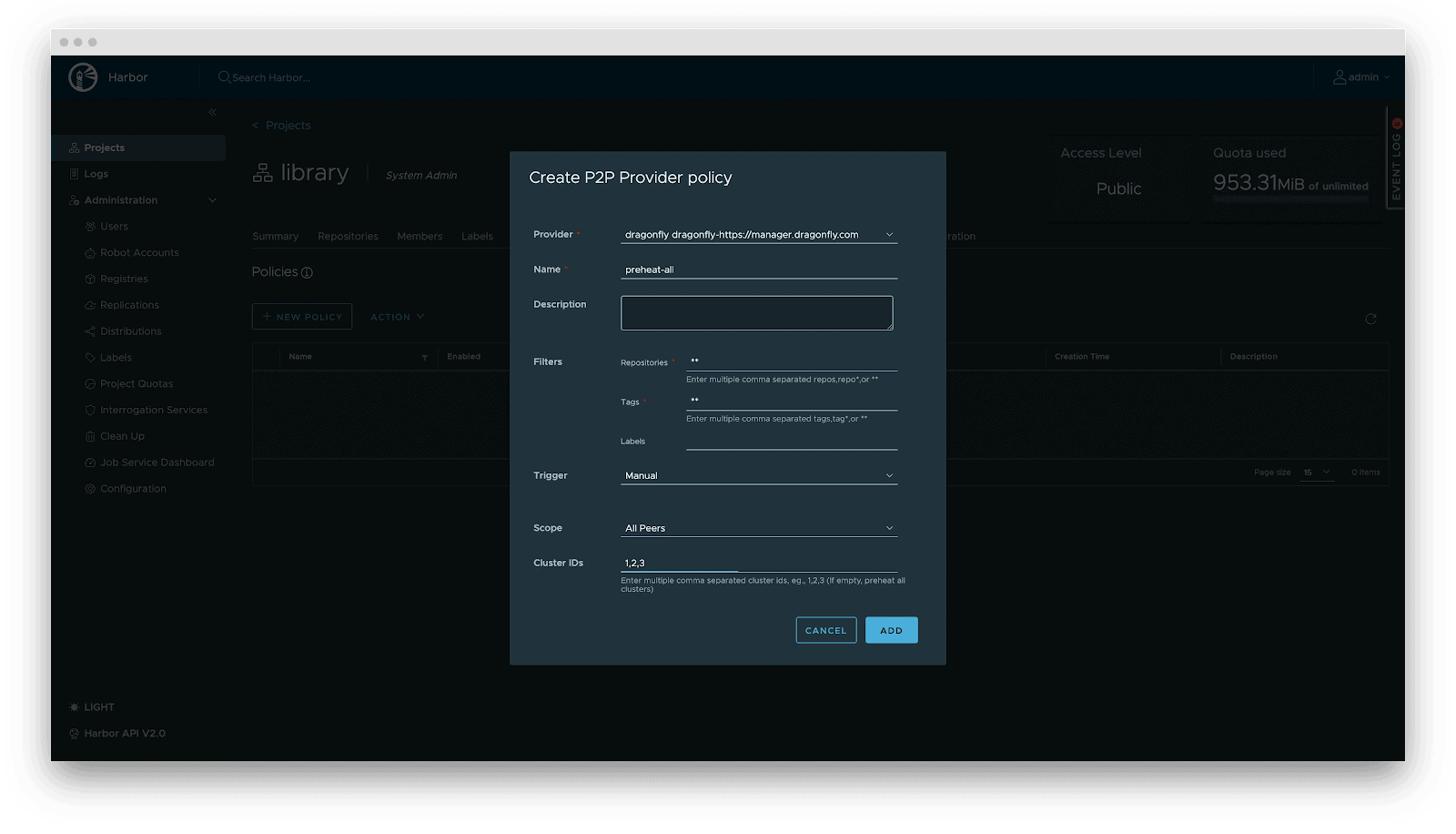
For latency-sensitive inference services, Harbor triggers Dragonfly to distribute and cache data on target nodes before service scaling. When the instance starts, the model loads from the local disk, achieving zero network latency.
Deployment
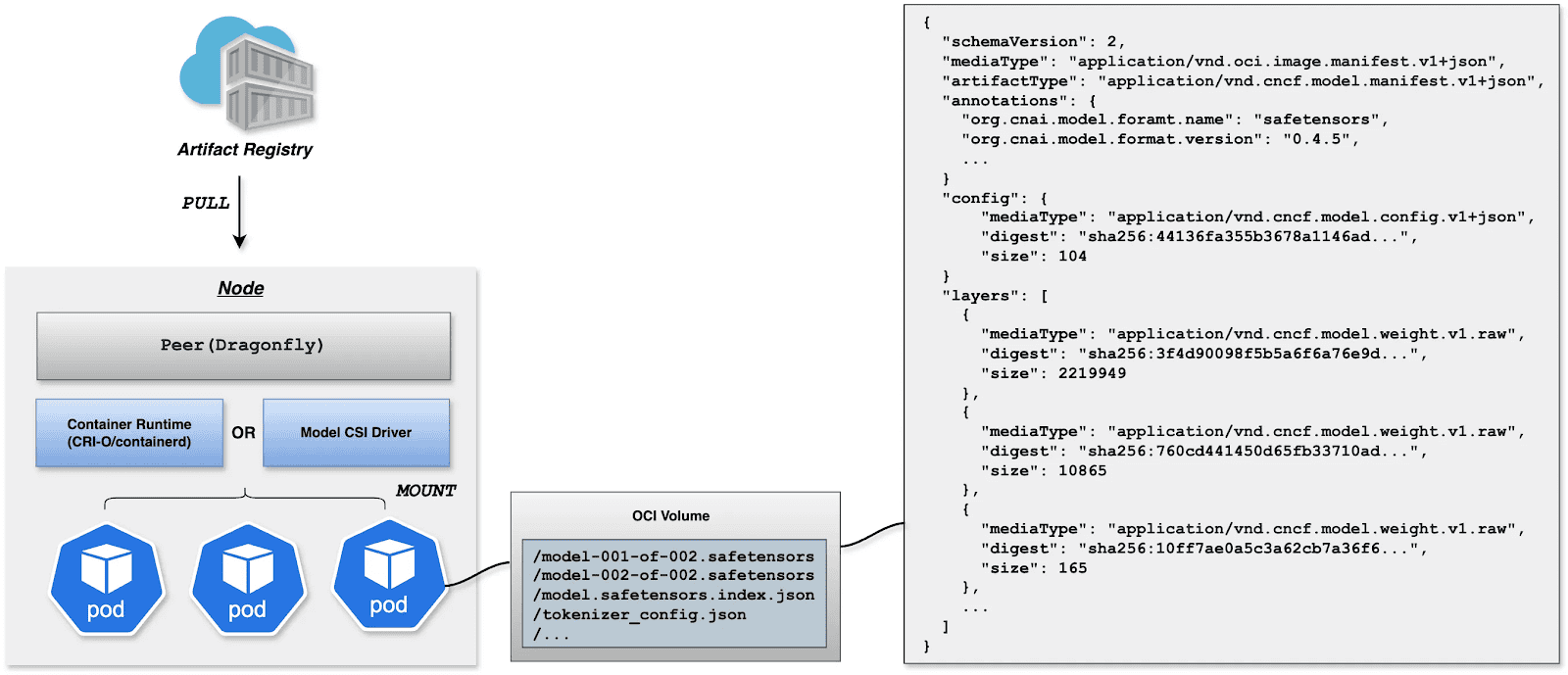
Deployment focuses on decoupling the Model (Data) from the Inference Engine (Compute). By leveraging Kubernetes declarative primitives, the Engine runs as a Container, while the Model is mounted as a Volume. This native approach not only enables multiple Pods on the same node to share and reuse the model, saving disk space, but also leverages the preheating and P2P capabilities of Harbor & Dragonfly to eliminate the latency of pulling large model weights, significantly improving startup speed.
OCI Volumes (Kubernetes 1.31+)
Native support for mounting OCI artifacts as volumes via CRI-O/containerd. This feature was introduced as alpha in Kubernetes 1.31 (requires enabling the ImageVolume feature gate) and promoted to beta in Kubernetes 1.33 (enabled by default, no feature gate configuration needed). CRI-O specifically enhances this for LLMs by avoiding decompression overhead at mount time by storing layers uncompressed, resulting in superior performance when mounting large model files.
Step 1: Build YAML
apiVersion: v1
kind: Pod
metadata:
  name: vllm-cpu-inference
  labels:
    app: vllm
spec:
  containers:
  - name: vllm
    image: openeuler/vllm-cpu:latest
    command:
    - "python3"
    - "-m"
    - "vllm.entrypoints.openai.api_server"
    args:
    - "--model"
    - "/models"
    - "--dtype"
    - "float32"
    - "--host"
    - "0.0.0.0"
    - "--port"
    - "8000"
    - "--max-model-len"
    - "1024"
    - "--disable-log-requests"
    env:
    - name: VLLM_CPU_KVCACHE_SPACE
      value: "1"
    - name: VLLM_WORKER_MULTIPROC_METHOD
      value: "spawn"
    resources:
      requests:
        memory: "2Gi"
        cpu: "1"
      limits:
        memory: "16Gi"
        cpu: "8"
    volumeMounts:
    - name: model-volume
      mountPath: /models
      readOnly: true
    ports:
    - containerPort: 8000
      protocol: TCP
      name: http
    livenessProbe:
      httpGet:
        path: /health
        port: 8000
      initialDelaySeconds: 60
      periodSeconds: 10
      timeoutSeconds: 5
    readinessProbe:
      httpGet:
        path: /health
        port: 8000
      initialDelaySeconds: 30
      periodSeconds: 5
  volumes:
  - name: model-volume
    image:
      reference: ghcr.io/chlins/qwen2.5-0.5b:v1
      pullPolicy: IfNotPresent
---
apiVersion: v1
kind: Service
metadata:
  name: vllm-service
spec:
  selector:
    app: vllm
  ports:
  - port: 8000
    targetPort: 8000
    protocol: TCP
    name: http
  type: ClusterIP
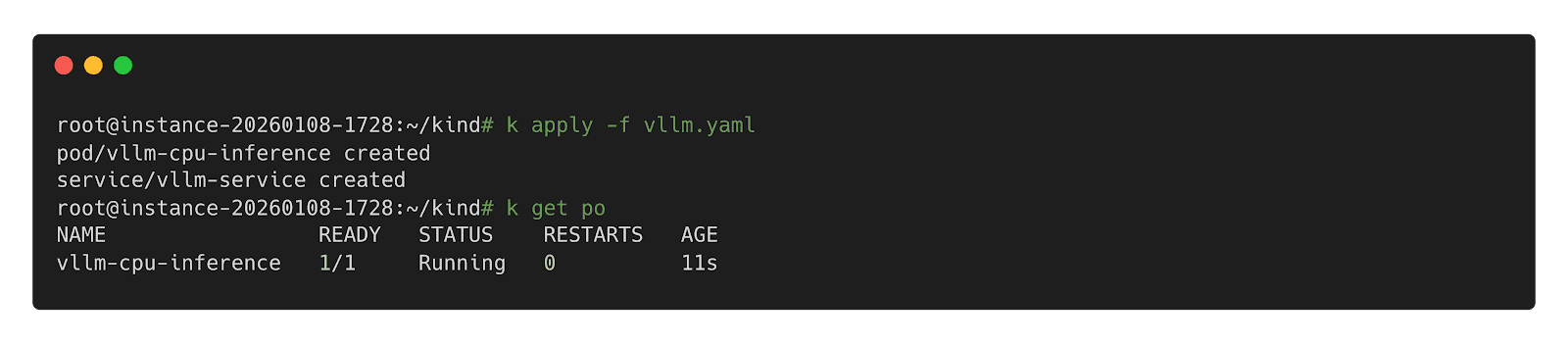
Step 2: Deploy inference Workload
Step 3: Call Inference Workload
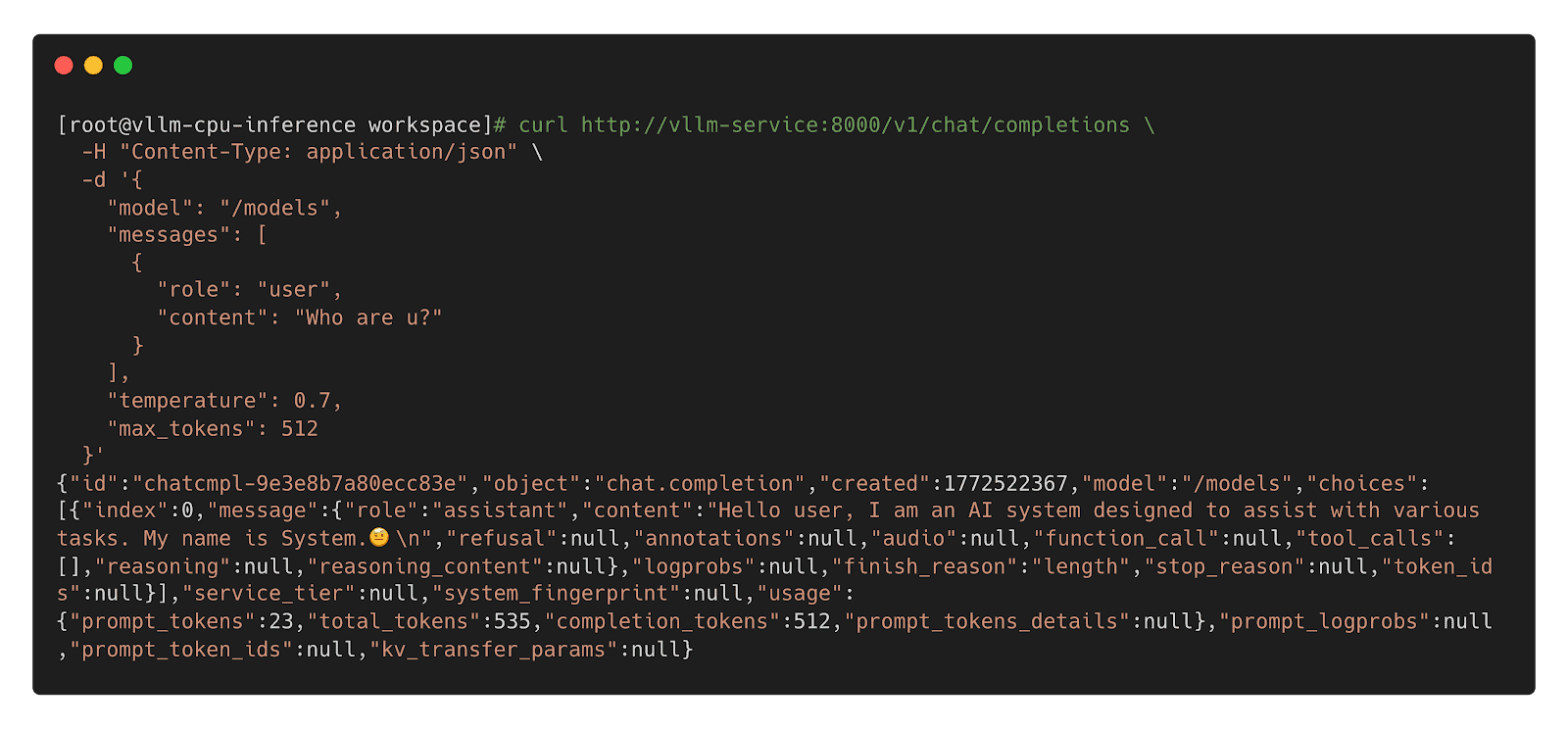
Model CSI Driver
For compatibility with Kubernetes 1.31 and older, we offer the Model CSI Driver as an interim solution to mount and deploy models as volumes. As OCI Volumes are slated for GA in Kubernetes 1.36, shifting to native OCI Volumes is recommended for the long term.
Step 1: Build YAML
apiVersion: v1
kind: Pod
metadata:
  name: vllm-cpu-inference
  labels:
    app: vllm
spec:
  containers:
  - name: vllm
    image: openeuler/vllm-cpu:latest
    command:
    - "python3"
    - "-m"
    - "vllm.entrypoints.openai.api_server"
    args:
    - "--model"
    - "/models"
    - "--dtype"
    - "float32"
    - "--host"
    - "0.0.0.0"
    - "--port"
    - "8000"
    - "--max-model-len"
    - "1024"
    - "--disable-log-requests"
    env:
    - name: VLLM_CPU_KVCACHE_SPACE
      value: "1"
    - name: VLLM_WORKER_MULTIPROC_METHOD
      value: "spawn"
    resources:
      requests:
        memory: "2Gi"
        cpu: "1"
      limits:
        memory: "16Gi"
        cpu: "8"
    volumeMounts:
    - name: model-volume
      mountPath: /models
      readOnly: true
    ports:
    - containerPort: 8000
      protocol: TCP
      name: http
    livenessProbe:
      httpGet:
        path: /health
        port: 8000
      initialDelaySeconds: 60
      periodSeconds: 10
      timeoutSeconds: 5
    readinessProbe:
      httpGet:
        path: /health
        port: 8000
      initialDelaySeconds: 30
      periodSeconds: 5
  volumes:
  - name: model-volume
    csi:
      driver: model.csi.modelpack.org
      volumeAttributes:
        model.csi.modelpack.org/reference: ghcr.io/chlins/qwen2.5-0.5b:v1
---
apiVersion: v1
kind: Service
metadata:
  name: vllm-service
spec:
  selector:
    app: vllm
  ports:
  - port: 8000
    targetPort: 8000
    protocol: TCP
    name: http
  type: ClusterIP
Step 2: Deploy Inference Workload
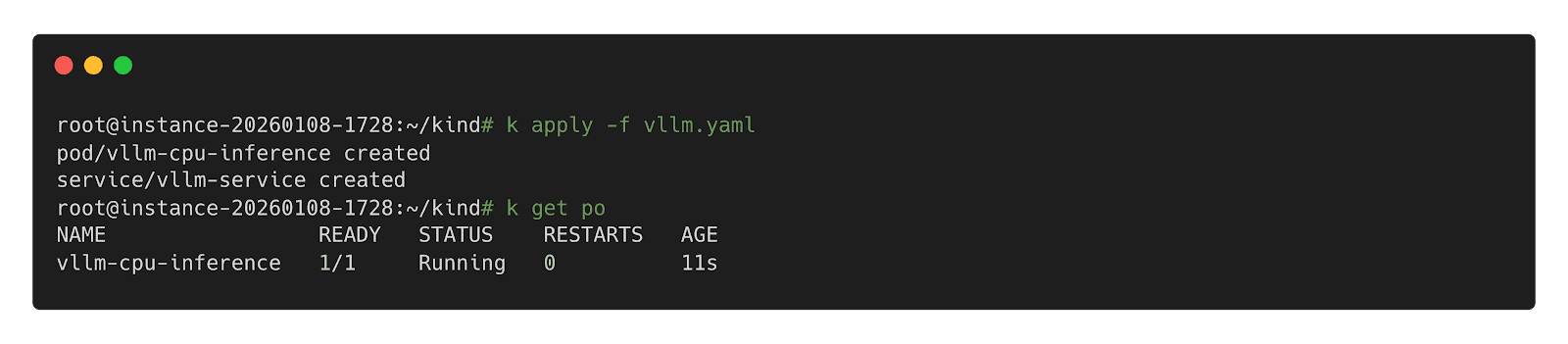
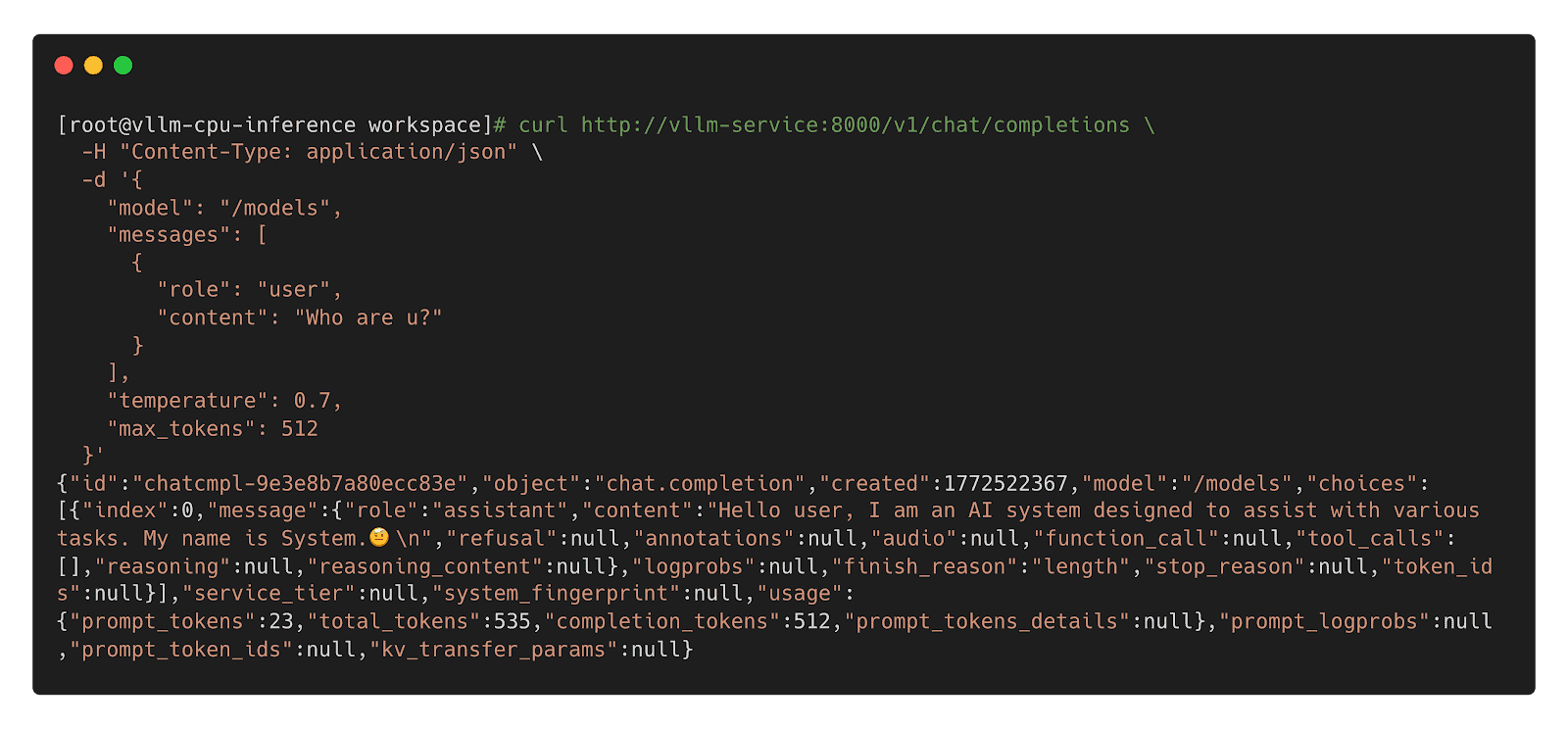
Step 3: Call Inference Workload
 Future
- Enhanced Preheating: Allow models to be preheated to specified nodes and querying cache distribution across nodes for model-aware pod scheduling.
- Dragonfly RDMA Acceleration: Enable Dragonfly to utilize InfiniBand or RoCE to improve the speed of distribution.
- Lazy Loading: Implement on-demand downloading of model weights to reduce startup latency.
- containerd Optimization: Enhance the OCI Volumes implementation to reduce decompression overhead for large layers.
- Model Security Scanning: Introduce deep scanning capabilities specifically designed for model weights to detect embedded malicious payloads.
- Kubernetes: https://github.com/kubernetes/kubernetes
- Harbor: https://github.com/goharbor/harbor
- Dragonfly: https://github.com/dragonflyoss/dragonfly
- CRI-O: https://github.com/cri-o/cri-o
- containerd: https://github.com/containerd/containerd
- modctl: https://github.com/modelpack/modctl
- Model CSI Driver: https://github.com/modelpack/model-csi-driver
- Model Spec: https://github.com/modelpack/model-spec
- ORAS: https://github.com/oras-project/oras
- Kubernetes – Read Only Volumes Based On OCI Artifacts: https://kubernetes.io/blog/2024/08/16/kubernetes-1-31-image-volume-source/
- Harbor – AI Model Processor: https://github.com/goharbor/community/blob/main/proposals/new/AI-model-processor.md
- Dragonfly – Load-Aware Scheduling Algorithm: https://d7y.io/docs/next/operations/deployment/applications/scheduler/#bandwidth-aware-scheduling-algorithm
- CRI-O – Add OCI Volume/Image Source Support: https://github.com/cri-o/cri-o/pull/8317
- containerd – Add OCI/Image Volume Source support: https://github.com/containerd/containerd/pull/10579
AI security: Identity and access control
4 use cases for AI in cyber security
Announcing Kubescape 4.0 Enterprise Stability Meets the AI Era
We are happy to announce the release of Kubescape 4.0, a milestone bringing enterprise-grade stability and advanced threat detection to open source Kubernetes security. This version focuses on making security more proactive and scalable. It also introduces capabilities that allow AI agents to utilize Kubescape to scan clusters as well as enable security posture scanning for the AI agents themselves.
Runtime Threat Detection Reaches General Availability (GA)
The highlight of this release is the GA of our Runtime Threat Detection. After rigorous testing, we’ve achieved proven stability at scale.
The engine is powered by CEL-based detection rules. These Common Expression Language rules are highly efficient and have direct access to Kubescape Application Profiles, which act as security baselines for your workloads.
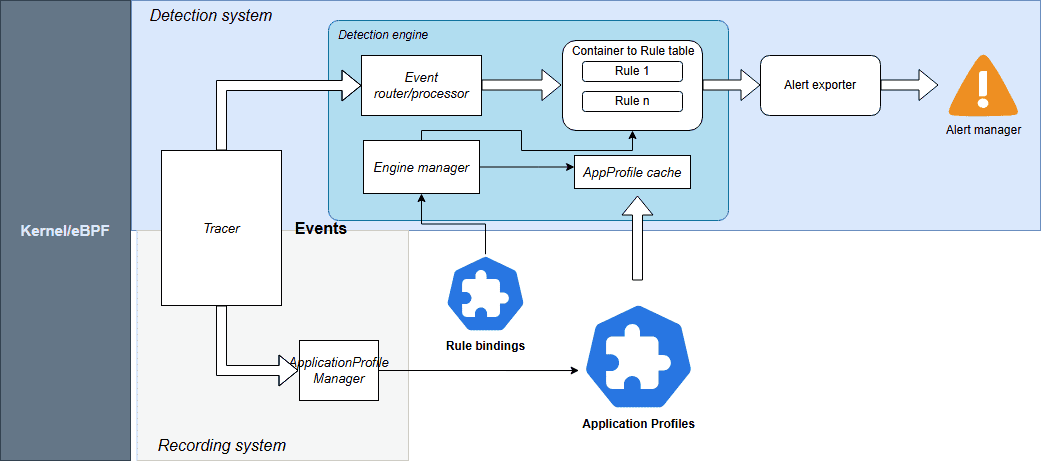
Source: Kubescpe.io
Kubescape 4.0 monitors a comprehensive suite of events including:
- System Interactions: Processes, Linux capabilities, and System calls
- Connectivity: Network and HTTP events
- Storage: File system activities
For seamless operations, Rules and RuleBindings are now managed as Kubernetes CRDs. You can export alerts to your existing stack, including AlertManager, SIEM, Syslog, Stdout, and HTTP webhooks.
Check out the Kubescape documentation for more information.
Kubescape Storage Reaches General Availability (GA)
Kubescape Storage has officially reached GA. This component leverages the Kubernetes Aggregated API, a Kubernetes-native feature, to act as a centralized repository for all security metadata.
By moving custom objects like Application Profiles, SBOMs, and vulnerability manifests into this dedicated storage layer, we’ve ensured that security data doesn’t overwhelm the standard etcd instance. This architecture has been proven to handle the demands of large-scale, high-density clusters, providing the performance required for modern enterprise environments.
For more information, check out Amir Malka’s session at Kubecon + CloudNativeCon North America 2025:
Extending Kubernetes API: The Hidden Power of Aggregated Server Objects – Amir Malka, ARMO
The Enhanced Node-Agent and Host-Sensor Deprecation
Based on community feedback regarding the complexity of node scanning, we have removed the host-sensor in Kubescape 4.0. While effective, this “pop-up” DaemonSet approach was often perceived as intrusive and difficult to monitor from a security perspective.
We have also officially removed the host-agent and integrated its capabilities directly into the node-agent. By establishing a direct API between the core Kubescape microservices and the node-agent, we’ve eliminated the need for ephemeral, high-privilege Pods. This architectural shift allows you to maintain a cleaner cluster environment with only one agent to manage, making your security posture both more stable and easier to audit.
Kubescape Enters the AI Era
With the launch of Kubescape 4.0, we are addressing the unique challenges of the AI-native era by looking at security from two equally important perspectives. This focus is critical, as the same cloud native principles that scale modern infrastructure are foundational for the next generation of inference pipelines and intelligent, agentic AI systems. We like to think of this as the “two sides of the AI security coin”: using Kubescape to empower AI agents with cybersecurity capabilities and using Kubescape to secure those same agents.
Empowering AI Security Sidekicks
As AI inference becomes the next major cloud native workload and Kubernetes evolves into the platform for intelligent systems, Kubescape 4.0 introduces a KAgent-native plug-in, allowing AI assistants to analyze Kubernetes security posture directly from the cluster. This plug-in provides the following capabilities to the AI agent:
- Security Scanning: AI agents can list and inspect vulnerability manifests for CVEs and review configuration scans to identify RBAC issues or missing security contexts.
- Detailed Remediation: Agents can pull specific guidance to fix vulnerabilities.
- Runtime Observability: Using ApplicationProfiles and NetworkNeighborhoods, AI assistants can look at how containers behave in real life, like what system calls they make, what files they access, and how they communicate over the network.
This integration enables an AI agent to become a true security sidekick; assisting humans to interpret complex security states and make informed decisions.
Scanning the AI Posture
AI agents are beginning to gain more autonomy, meaning their infrastructure must be secured. We need robust security guardrails to stop agents from exploiting them for high-risk actions like unauthorized access or deleting production data. Kubescape 4.0 introduces security posture scanning specifically for KAgent, the CNCF Sandbox project for AI orchestration.
Since KAgent creates direct pathways between AI models and enterprise infrastructure, misconfigurations can be high-risk. Our new analysis identifies 42 security-critical configuration points across KAgent’s CRDs. We are introducing 15 Rego-based controls to detect issues such as:
- Empty security contexts in default deployments
- Missing NetworkPolicies
- Over-privileged controller-wide namespace watching
By applying these rigorous standards, we are ensuring that the “brains” of your AI operations are as secure as the workloads they manage.
Compliance
In the continuously evolving cloud native landscape, robust governance and consistent, auditable compliance are the critical foundations that allow for safe and sustainable innovation. Kubescape continues to help keep your clusters compliant with the latest industry standards:
- CIS Benchmark Updates: Support for versions 1.12 (Vanilla Kubernetes) and 1.8 (EKS, AKS).
Community Corner
We’d like to welcome our new maintainer, Amir Malka, and thank our emeritus maintainers, David Wertenteil and Craig Box, for their contributions over the years.
To join the Kubescape community and find information on how you can ask questions, join in the conversation, and contribute, visit the link here.
If you are a Kubescape user, we’d love to hear from you. Please reach out if you would like to share an interesting use case with the community or add yourself to our list of adopters.
AI security: Defending against prompt injection and unsafe actions
Pages
